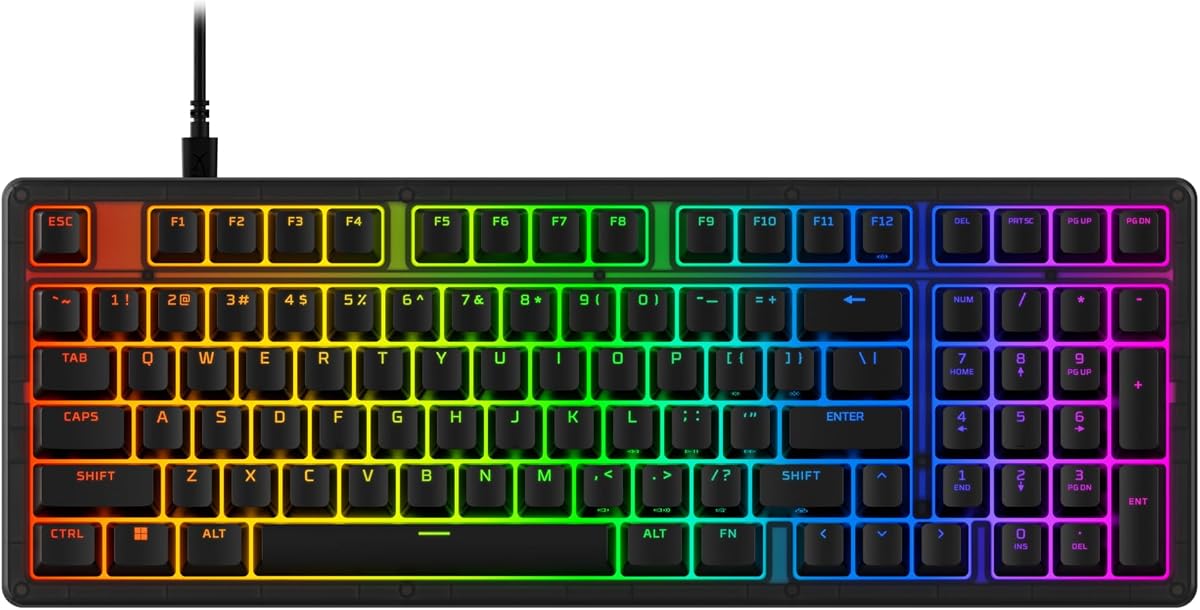
HyperX Eve 1800
4.6Editor score
10-zone customizable RGB lighting
Dedicated media buttons included
Membrane switches with anti-ghosting
Finding the right input device can transform your workflow significantly. A 1800 compact keyboard offers a unique balance between full functionality and desk space efficiency. This layout keeps essential keys close while maintaining a numeric pad for productivity tasks.
We evaluated ten top models based on build quality, typing feel, and connectivity options. Our analysis covers mechanical and membrane switches along with wireless capabilities and RGB features. Each product was selected for its ability to meet diverse user needs effectively.
Every pick below highlights specific strengths and ideal use cases for different setups. You will find options ranging from industrial durability to sleek wireless designs. Please note that prices and availability may change over time so check current listings.
4.6Editor score

4.6Editor score

4.4Editor score
As an Amazon Associate we earn from qualifying purchases.
This table provides a side-by-side look at the key specifications and features of each model. Use it to quickly compare switch types connectivity options and special functions across the entire selection.




The HyperX Eve 1800 stands out as an accessible entry into compact mechanical-style typing. With a solid 4.6 rating it delivers reliable performance for gaming and daily tasks. Its membrane switches offer a cushioned feel that reduces finger fatigue during long sessions.
We may earn a commission when you buy through this link, at no additional cost to you.
This keyboard shines with its 10-zone RGB lighting which allows users to sync effects with gaming moments. Dedicated media buttons make volume control effortless without alt-tabbing. The NGENUITY software adds depth for macros and profiles ensuring the device adapts to your workflow.
While membrane switches lack the tactile snap of mechanical counterparts they provide consistent actuation. The layout sacrifices a full number row for space efficiency but keeps essential keys accessible. Some users might prefer hot-swap capabilities but this model prioritizes value and simplicity.
Gamers and casual typists seeking a budget-friendly option will find this model ideal. It balances functionality and aesthetics without breaking the bank. We recommend it for those who want RGB flair and media controls in a condensed form factor.
The 10-zone RGB system lets you create unique visual profiles. Sync lighting with game events for immersion.
The compact design frees up desk space for mouse movement. Ideal for smaller desks or console setups.
We may earn a commission when you buy through this link, at no additional cost to you.
The Cherry G80-1800 is built for environments where reliability is paramount. Rated at 4.1 it is a favorite for industrial and embedded systems. The MX Black switches provide a linear feel that is smooth and consistent for repetitive typing.
We may earn a commission when you buy through this link, at no additional cost to you.
Its dual USB and PS/2 connectivity makes it versatile for legacy systems. The gold crosspoint contacts ensure signal integrity even under high usage. This keyboard is designed to withstand continuous operation without failure or degradation over time.
Users may find the aesthetic plain compared to modern gaming boards. However the focus here is purely on function and longevity. The compact dimensions fit well into tight enclosures or specialized workstations where space is limited.
Ideal for system integrators and professionals needing a robust input device. It excels in scenarios where uptime is critical. We suggest this for industrial setups requiring proven hardware with minimal maintenance needs.
Supports both USB and PS/2 for broad compatibility. Essential for legacy industrial machines.
Switches rated for 100 million actuations. Ensures longevity in high-frequency usage environments.
We may earn a commission when you buy through this link, at no additional cost to you.
HyperX Origins 2 1800 leads our list with premium features tailored for enthusiasts. Its 4.6 rating reflects the high quality of build and performance. The hot-swap sockets allow you to change switches without soldering for a personalized experience.
We may earn a commission when you buy through this link, at no additional cost to you.
With an 8k polling rate input latency is virtually non-existent for competitive gaming. The swappable housing lets you change the look of your desk without buying a new board. O-ring mounts provide a light bounce and deeper sound for satisfying keystrokes.
The high profile form factor elevates keys for easier engagement though it may require wrist adjustment. Customization is deep with NGENUITY software supporting layers and macros. This level of flexibility comes at a cost compared to standard keyboards.
Enthusiasts looking to tweak their typing feel will love this model. It combines gaming performance with aesthetic freedom. We recommend it for those who value customization and top-tier input response above all else.
Change switches easily to adjust sound and feel. No tools required for switch replacement.
Communicates with PC 8000 times per second. Ensures zero lag for competitive gaming.
We may earn a commission when you buy through this link, at no additional cost to you.
This model continues the legacy of reliable industrial typing devices. While ratings are limited it adheres to strict ISO standards for quality. The mechanical switches ensure tactile feedback that is precise for data entry tasks.
We may earn a commission when you buy through this link, at no additional cost to you.
The USB and PS/2 interface options allow it to integrate seamlessly into various systems. Its dimensions fit into tight spaces making it versatile for kiosks or specialized consoles. The black finish remains neutral for professional environments.
It lacks the RGB or smart features found in consumer models. However the focus on durability and compliance makes it a solid choice for specific needs. Users should expect a no-nonsense approach to keyboard functionality.
Best for IT managers or industrial buyers needing proven hardware. It offers a straightforward solution for environments where aesthetics matter less than reliability. We suggest checking compatibility with your specific system before purchasing.
Meets ISO 9001 standards for manufacturing. Ensures consistent build quality and reliability.
Designed to fit into narrow workstations. Maximizes space efficiency without losing functionality.
We may earn a commission when you buy through this link, at no additional cost to you.
The Logitech Alto Keys K98M brings a premium feel to the 1800 category. With a 4.4 rating it impresses with its gasket mount and hot-swappable switches. The marble switches offer smooth actuation that feels like a high-end typewriter.
We may earn a commission when you buy through this link, at no additional cost to you.
Wireless connectivity via Bluetooth or Logi Bolt ensures a clean desk. The battery lasts up to 12 months allowing extended use between charges. This keyboard fits perfectly into modern home office setups seeking both style and function.
The lack of media keys is a minor trade-off for the sleek design. You can program function keys to control media if needed. It balances luxury aesthetics with practical features like a functional numpad layout.
Professionals who want a polished and comfortable typing experience will enjoy this. It is ideal for creative spaces where desk aesthetics matter. We recommend it for those willing to invest in a high-quality wireless mechanical keyboard.
The gasket mount absorbs vibration for a softer feel. Provides a satisfying tactile experience for typing.
Connects via Bluetooth or USB receiver. Battery lasts up to 12 months for consistent use.
We may earn a commission when you buy through this link, at no additional cost to you.
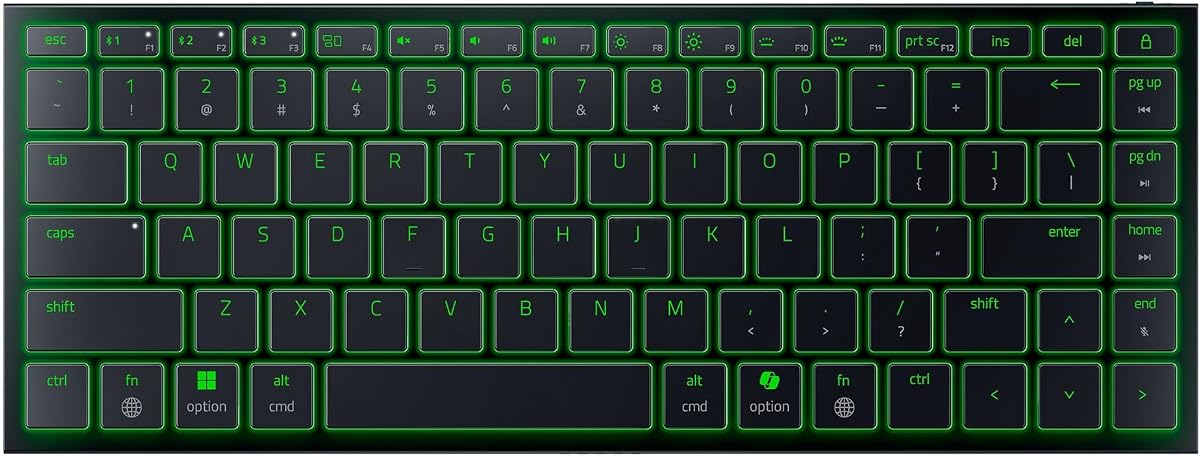
The Razer Joro Wireless is designed for gamers on the move. Rated 4.0 it packs features into a lightweight ultra portable chassis. The low profile keys minimize finger strain and reduce the overall height for travel.
We may earn a commission when you buy through this link, at no additional cost to you.
Bluetooth 5.0 allows pairing up to three devices which is great for switching between PC and mobile. The Chroma RGB offers personalization even on a compact board. Snap Tap technology aids rapid directional inputs in games.
While it is compact it is more 75% than strict 1800 layout. This means the numpad is smaller or integrated differently. Still it offers a functional row and arrows in a design that fits easily into a backpack.
Digital nomads and frequent travelers will find this keyboard ideal. It balances gaming performance with travel practicality. We recommend it for those who need a high-quality gaming keyboard they can take anywhere.
Connect three devices via Bluetooth. Switch between them instantly for flexible workflows.
Prioritizes inputs between two keys for faster control. Helps with rapid directional changes.
We may earn a commission when you buy through this link, at no additional cost to you.
This version maintains a traditional 104 key layout within a compact form. Its lower rating suggests it caters to specific niche industrial needs. The gold contacts ensure signal reliability and long term durability.
We may earn a commission when you buy through this link, at no additional cost to you.
The Codeset 3 support via PS/2 connection makes it a strong choice for Unix systems. It balances standard key count with reduced overall footprint. The design remains functional and robust for enterprise environments.
Users seeking modern features like USB-C will not find them here. This model prioritizes compatibility with older hardware standards. It is a specialized tool rather than a general consumer keyboard.
System admins managing legacy systems will appreciate this utility. It offers a reliable solution for specific compatibility requirements. We suggest this for environments where specific protocol support is mandatory.
Full layout maintains standard key count. Ideal for environments needing full number access.
Codeset 3 support for Unix systems. Ensures compatibility with older enterprise infrastructure.
We may earn a commission when you buy through this link, at no additional cost to you.
The Cherry Stream Wired is designed for shared office environments where noise matters. Its 4.3 rating highlights its whisper-quiet scissor switches. It delivers a precise typing experience without the loud clacks of mechanical keyboards.
We may earn a commission when you buy through this link, at no additional cost to you.
The compact TKL layout reduces desk clutter. The GS safety mark ensures it meets high safety standards for daily use. A metal plate adds stability preventing movement during intense typing sessions.
Without a numpad it may not suit heavy data entry roles. However for general office work it offers excellent ergonomics. The design encourages a more natural mouse and keyboard position for better posture.
Offices looking for a quiet and reliable tool should consider this model. It balances function with a focus on user comfort. We recommend it for environments where a quiet workspace is a priority.
SX scissor tech ensures a precise pressure point. Delivers a quiet and consistent typing feel.
Removing the numpad brings mouse closer. Promotes a more natural and ergonomic posture.
We may earn a commission when you buy through this link, at no additional cost to you.
Logitech Pebble Keys 2 K380s focuses on portability and ease of use. With a 4.3 rating it offers a slim design that slips easily into bags. The scooteroped keys provide a familiar laptop typing experience for comfort.
We may earn a commission when you buy through this link, at no additional cost to you.
Bluetooth connectivity allows switching between three devices at once. This makes it ideal for users managing multiple screens or platforms. The battery lasts up to three years reducing the need for frequent replacements.
The keys are flat and low profile which reduces travel for some users. It lacks a full numpad which may be a constraint for some tasks. However the space-saving design maximizes mobility for daily tasks.
Students and travelers needing a reliable portable option will love this. It is designed to go with you everywhere without adding bulk. We recommend it for multi-device users prioritizing mobility and long battery life.
Easy-Switch buttons toggle between devices. Manage PC tablet and phone with one click.
Up to three years on a single battery. Auto-sleep mode preserves power when idle.
We may earn a commission when you buy through this link, at no additional cost to you.
The ProtoArc XK04 is a unique entry optimized for mobile devices. Rated 4.5 it folds into a small compact size with a protective leather cover. This design allows it to fit in pockets or small bags easily.
We may earn a commission when you buy through this link, at no additional cost to you.
Bluetooth 5.1 supports up to three simultaneous connections for switching between devices. The auto-sleep standby mode extends battery life significantly. Charging is done via USB-C making it convenient for modern users.
The keycaps are smaller which takes some getting used to. However they are optimized for on-the-go messaging and notes. The leather cover adds a premium feel and protects the keys during travel.
This is perfect for iPad or tablet users who need physical typing. It offers a balance between size and functionality that few others match. We recommend it for travelers seeking a foldable and reliable solution.
Leather cover adds protection and portability. Folds into a compact form for easy transport.
Recharges via modern USB-C standard. Auto-sleep mode ensures long standby times.
We may earn a commission when you buy through this link, at no additional cost to you.
Selecting the right keyboard depends on balancing layout, switch type, and connectivity. This section explores the key factors to consider for your specific needs.
A 1800 compact keyboard keeps a full number pad while reducing overall footprint. This differs from TKL or 60% layouts by maintaining essential number keys. Consider if you rely heavily on numbers for spreadsheets or data entry.
Switches define the typing feel and noise level. Mechanical switches offer tactile feedback and durability whereas membrane switches are quieter and softer. Consider your environment and whether you prefer a clicky or linear feel.
Wired USB offers zero latency and reliability while wireless provides a clean desk. Look for Bluetooth or proprietary receivers for seamless device pairing. Consider how many devices you need to switch between.
Polling rate determines how often the PC checks for keystrokes. Higher rates like 8k reduce input lag for gaming. For office work standard rates are sufficient but gamers may prefer high performance.
Look for sturdy materials like aluminum or reinforced plastic for longevity. Industrial models often feature metal plates for stability. Consider how much daily wear and tear the device will face.
Hot-swap sockets allow changing switches without soldering. RGB lighting and software macros add personalization. Consider if you want to adjust the keyboard's look or function over time.
Key height and slope impact comfort over long sessions. High profile keys may require wrist adjustments. Ensure the keyboard fits your typing posture to avoid strain.
Prices range from budget-friendly membrane to premium mechanical models. Higher prices often reflect build quality and customization features. Determine how much you are willing to spend for your needs.
Connect the keyboard using USB or Bluetooth and install necessary drivers. Most models plug and play but software may be needed for RGB settings. Ensure the device is recognized by your operating system before typing.
Clean the keyboard regularly using compressed air to remove dust and crumbs. Use a soft brush for keycap crevices and avoid liquid cleaners. This maintains switch performance and hygiene over time.
Store wireless keyboards in cool dry places to preserve battery health. Turn off unused devices to extend battery life. For mechanical boards consider keycap removers for deep cleaning when needed.
Yes if you need a numpad but want to save space. The layout reduces the overall footprint while keeping essential number keys. It is ideal for smaller desks or setups requiring mouse movement room.
Hot-swap sockets let you change switches without soldering. This allows you to adjust the feel and sound of your typing experience. It is useful for enthusiasts who want to customize their keyboard later.
Modern wireless keyboards with 1ms lag are often as fast as wired ones. Models with high polling rates work well for gaming. However wired connections still offer the absolute lowest latency.
Use compressed air to blow out debris from between keys. You can remove keycaps for deeper cleaning but avoid water near the electronics. Keep the device dry to maintain electrical integrity.
A gasket mount uses rubber pads to sit the PCB. This isolates the frame from the keys for a softer typing feel. It creates a premium and satisfying tactile experience.
Basic typing works without software but features like RGB need apps. Programs like NGENUITY or Logi Options+ allow customization. You can choose to use them or skip them entirely.
Choosing a 1800 compact keyboard is about balancing space and functionality. The HyperX Origins 2 1800 offers top performance for enthusiasts. The Cherry G80-1800 remains a reliable choice for industrial needs.
Prioritize switch type and connectivity based on your daily tasks. Wired is best for gaming while wireless suits mobile workflows. Consider customization options if you plan to tweak your setup later.
Prices and features change frequently so verify current specs before buying. Check for ongoing deals to get the best value. Our guide helps you find the right model for your needs.