
MAYFLASH Arcade Stick F700
4.5Editor score
Wireless Bluetooth connection
Compatible with many systems
Supports Sanwa components
This guide compares the top Arcade Stick for PS5 options including tournament grade controllers licensed by Sony and budget friendly alternatives for every
Finding the right Arcade Stick for PS5 is essential for anyone who wants to dominate competitive fighting games. These controllers offer precision and speed that standard gamepads simply cannot match for serious enthusiasts.
We have evaluated ten leading models based on build quality, component reliability, and compatibility with the latest titles. Our analysis focuses on features that matter most during intense tournament matches.
Each pick highlights key strengths and potential trade-offs to help you choose wisely. Keep in mind that product availability and pricing can change frequently over time.
4.5Editor score

4.6Editor score

4.2Editor score
The following table provides a side-by-side overview of all ten products we reviewed. It highlights essential specifications and key features to help you make an informed decision quickly.




This high-end pro fight stick for PlayStation 5 delivers the performance serious players need. With a strong rating of 4.6 out of 5 stars it stands out for its tournament grade components.
We may earn a commission when you buy through this link, at no additional cost to you.
The device features Hayabusa buttons and joystick which are known for rapid response and durability. It opens up for easy customization and maintenance allowing you to adjust internal parts without specialized tools.
While the price is higher than budget models the durability justifies the cost for competitive gamers. The officially licensed status by Sony guarantees seamless integration with system features.
If you are committed to fighting games on PS5 this stick is the top recommendation. It balances premium materials with practical design for long sessions.
The Hayabusa parts provide tactile feedback that reduces accidental inputs during intense matches.
The panel opens easily so you can swap parts or clean the joystick when necessary.
We may earn a commission when you buy through this link, at no additional cost to you.
Developed with professional gamers this stick aims for top performance in fighting games like Street Fighter and Tekken. It receives a 4.2 star rating for its feature rich design.
We may earn a commission when you buy through this link, at no additional cost to you.
The Nacon Daija Arcade Stick software allows full button configuration on PC and Mac. You can create game profiles easily to match your play style for specific titles.
A textured palm rest provides sturdy support which helps prevent fatigue during long matches. The lock function also prevents accidental presses that could interrupt intense fights.
This model is ideal if you want deep customization without sacrificing build quality. It includes all necessary tools to get started quickly on your console.
The intuitive software interface lets you set profiles without needing technical expertise.
Two joystick heads are included so you can choose the best fit for your grip.
We may earn a commission when you buy through this link, at no additional cost to you.
This controller supports wireless Bluetooth and 2.4G receiver alongside wired connections. It earns a 4.5 star rating for offering versatile connectivity at a lower price.
We may earn a commission when you buy through this link, at no additional cost to you.
The included 2.4g receiver has a special hidden compartment to store it safely when not in use. Updating to the latest firmware ensures it works with Switch 2 by Bluetooth.
While it does not support Xbox consoles it covers most other platforms including PS5 and PC. You can output background music and chat via wired headsets during gameplay.
For players who want wireless freedom without spending a lot this is a great choice. The turbo functions add extra utility for specific game modes.
Three connection modes ensure you can play across multiple devices seamlessly.
The hidden compartment keeps the receiver secure and prevents it from getting lost.
We may earn a commission when you buy through this link, at no additional cost to you.
This wired joystick is an officially licensed Sony peripheral ensuring it works smoothly with PS5 and PS4 systems. It holds a 4.5 rating for its build and audio features.
We may earn a commission when you buy through this link, at no additional cost to you.
Authentic Qanba buttons and lever provide a classic arcade feel that competitive players appreciate. The full control panel includes a touch pad for added functionality during menus.
A 3.5-mm microphone input with mute button control lets you manage voice chat easily. However it does not offer wireless connectivity which may be a limitation for some.
This unit is perfect for players who prefer a traditional wired setup. The reliable components ensure consistent performance across all fighting titles.
The microphone input allows direct connection for clear communication during online matches.
The built-in touch pad helps navigate menus without switching controllers.
We may earn a commission when you buy through this link, at no additional cost to you.
This Elite version uses premium quality Sanwa components for responsive buttons and precision joystick. It achieves a 4.6 rating due to the high standards of its internal hardware.
We may earn a commission when you buy through this link, at no additional cost to you.
The full size anti-slip rubber mat works to hold the fighting stick firmly in place on any surfaces. This stability is crucial for executing precise movements during tournaments.
It supports wired headsets for music and chat on PS5 and PC Xinput. The Turbo functions allow different speed settings to suit various game mechanics.
If you want the reliability of Sanwa parts without paying premium brand prices this is a solid option. It supports most platforms except Xbox consoles.
The rubber mat ensures the stick stays put even during vigorous shaking.
Eight highly responsive buttons help you strike instantly and surely in every game.
We may earn a commission when you buy through this link, at no additional cost to you.
This bundle includes the MAGICBOOTS for PS5 and PS4 so no original controller is needed for plug and play. It rates 4.0 for offering broad compatibility across many systems.
We may earn a commission when you buy through this link, at no additional cost to you.
When using on Xbox 360 or Xbox One a wired Microsoft Xbox 360 or Xbox One Controller is required. This extra step can be inconvenient but the range is impressive.
The stick supports X input and D input when being used on PC for flexible options. Turbo functions with different speed settings are available for games that need them.
For players who switch between consoles this bundle offers the most versatility. It is an economical way to get fighting stick access on Xbox and PlayStation.
The bundle allows play on Xbox and PS5 which is rare in this price range.
No need to plug in another controller on PS4 and PS5 for basic use.
We may earn a commission when you buy through this link, at no additional cost to you.
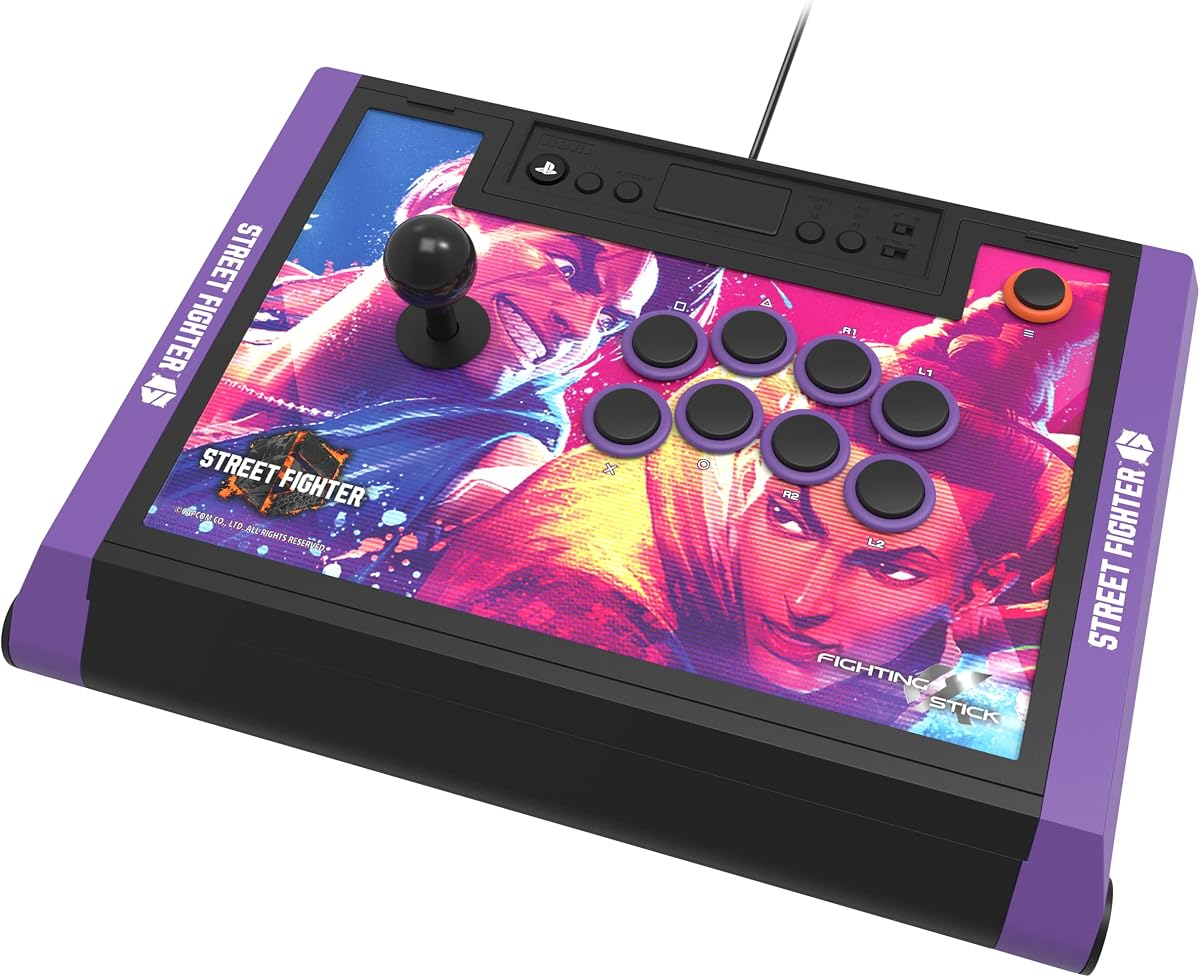
This high-end tournament ready fight stick features Street Fighter 6 artwork for fans of the game. It holds a 4.5 rating for delivering the same quality as the standard Alpha.
We may earn a commission when you buy through this link, at no additional cost to you.
It includes a link to 18 downloadable hi-res images of your favorite Street Fighter 6 characters for top-panel customization. This allows you to change the look easily without buying new hardware.
The stick opens for easy customization and maintenance to keep it running well for years. It features HORI's proprietary HAYABUSA buttons and joystick for top speed.
If you love Street Fighter 6 this edition adds a special touch to your setup. It remains a top choice for serious players looking for style and substance.
Downloadable images let you swap art to match your main character easily.
Officially Licensed by Sony and Capcom ensures full compatibility and quality control.
We may earn a commission when you buy through this link, at no additional cost to you.
This joystick has a switch to change between PS5, PS4, and PC which simplifies setup for multi-device owners. It has a 4.3 rating for solid build quality and licensing.
We may earn a commission when you buy through this link, at no additional cost to you.
The control panel includes swappable Sanwa JLF joystick tops allowing you to adjust the feel to your preference. This flexibility is rare in mid-range sticks without extra parts.
A 3.5-mm microphone input with mute button control helps manage voice chat during matches. It is an officially licensed Sony peripheral so it meets strict quality standards.
For players who want to upgrade their joystick feel this model is convenient. The switch makes it easy to move between systems without reconnecting cables.
The dedicated switch avoids the need for constant cable swapping between consoles.
Swappable tops let you adapt the stick to different grip styles quickly.
We may earn a commission when you buy through this link, at no additional cost to you.
This high-end tournament ready fight stick features TEKKEN 8 top panel artwork and downloadable alternate artwork to print. It receives a 4.6 rating for its premium construction and features.
We may earn a commission when you buy through this link, at no additional cost to you.
The stick opens for easy customization and maintenance which helps keep it in top shape for tournaments. It features HORI's proprietary HAYABUSA buttons and HAYABUSA joystick for speed.
Being officially Licensed by Sony and Bandai Namco Entertainment ensures full compatibility with the system. The alternate artwork lets you change the look whenever you want.
If you play Tekken regularly this themed stick adds a unique touch to your setup. It combines top performance with specific game aesthetics for dedicated fans.
Alternate artwork downloads let you keep your stick fresh with new designs.
Licensing by Sony and Bandai Namco guarantees it meets high standards.
We may earn a commission when you buy through this link, at no additional cost to you.
This leverless controller uses four-direction movement buttons instead of a joystick which reduces input errors for competitive play. It has a 4.3 rating for its innovative design and low latency.
We may earn a commission when you buy through this link, at no additional cost to you.
Input latency is less than 1ms in all modes thanks to the RP2040 controller chip and firmware. The switches and keycaps support hot swapping so you can remount without soldering.
Note that it requires an additional arcade stick converter for PS5 compatibility which is a step for setup. The integrated OLED screen displays your current input mode and button layout.
For players who prefer button layouts for speed this stick offers a unique edge. The customizable OLED screen and RGB lighting make it a standout visually as well.
The RP2040 chip ensures inputs register faster than standard wired sticks.
You can replace switches easily without tools to change your feel.
We may earn a commission when you buy through this link, at no additional cost to you.
Selecting the right controller involves considering compatibility, components, and customization options. Use this guide to understand what matters most for your gameplay.
Ensure the stick lists PS5 explicitly in its compatibility specs. Some units only work for fighting games or need extra steps for full system support.
Check that the device works with your preferred titles like Street Fighter 6 or Tekken 8 before buying.
Look for sticks that use reputable brands like Sanwa or Hayabusa for the joystick. These provide smoother motion and less resistance than generic parts.
A good joystick should return to center quickly without feeling loose or stiff during play.
Buttons should be responsive and durable to withstand repeated rapid inputs. Mechanical switches are common in higher end models for better feedback.
Avoid models with soft rubber buttons that may wear out quickly under heavy use.
Sticks that open easily allow you to upgrade parts or clean the unit later. This extends the lifespan of your device if a component fails.
Check if the model supports different joystick heads or button layouts for future tweaks.
A sturdy case prevents the stick from sliding on your desk during intense matches. Weighted designs or rubber feet add stability on flat surfaces.
Avoid plastic that feels brittle or joints that might crack after a short time.
Decide if you need wireless connection or prefer wired for zero latency. Wireless often uses 2.4G receivers which are more stable than Bluetooth.
Wired sticks are simpler and avoid battery issues but limit your seating arrangement.
Many fight sticks have a 3.5mm jack for connecting headsets directly to the unit. This keeps your game audio clear while managing voice chat easily.
Look for mute buttons or volume controls on the stick for convenience during matches.
Compare prices against the features offered to find the best value for your needs. Higher cost often reflects better components and official licensing with the console.
Ensure there is a warranty available from the manufacturer in case of defects.
Connect the stick via USB to your PS5 console and power it on. Navigate to controller settings to ensure it is recognized before launching a game.
Place the stick on a flat stable surface to prevent sliding during play. If it has rubber feet make sure they are clean to maintain grip.
Regularly clean the buttons and joystick with a soft dry cloth to remove dust. Avoid using liquids directly on the components to prevent damage.
Most are optimized for fighting games and may not support navigation in system menus. You may need to switch back to the standard controller for some tasks.
Many models allow swapping the joystick head with compatible parts. Always check if the mounting screws match before purchasing new components.
Only the GuileKeys leverless model mentions a specific converter requirement. Others that list PS5 compatibility work directly without extra hardware.
Options vary with some offering Bluetooth and 2.4G wireless plus wired modes. Others are wired only for zero latency and constant power.
Check the firmware update status via the manufacturer website if applicable. Try a different USB port or restart the console to refresh the connection.
Most models in this list support Windows and PC games alongside consoles. Some offer specific modes like Xinput for better PC compatibility.
We have reviewed ten excellent options ranging from budget to premium designs for PS5 players. The HORI and MAYFLASH models lead in compatibility and durability for competitive use.
Prioritize sticks with reputable components like Sanwa or Hayabusa if you play frequently. Licensing and build quality are key factors for long term performance.
Prices and availability can change quickly so verify the latest details before purchasing. Check current listings to ensure the model matches your specific needs today.