
GIGABYTE B550M K
4.4Editor score
Supports Ryzen 5000 Series
PCIe 4.0 M.2 Slot
Digital 3+3 VRM Design
This guide compares ten cheap motherboard options across AMD and Intel platforms to help you find reliable performance without overspending on your next PC
Finding a cheap motherboard does not mean sacrificing quality or reliability for your next computer build. Whether you are upgrading an old system or assembling a new budget rig, the right board ensures stability and future compatibility for your components.
We analyzed ten highly rated models based on user feedback, feature sets, and platform support. This list covers micro-ATX and ATX form factors across AM4, AM5, and Intel 1700 sockets to help you choose the best value.
Each pick highlights key strengths like power delivery, connectivity, and expansion options so you can match the board to your specific CPU and case. Prices change frequently, so always verify the current listing before you make your final purchase decision.
4.4Editor score

4.5Editor score

4.5Editor score
Below is a detailed side-by-side comparison of all ten models selected for this guide. We highlight key specifications like chipset support, memory types, and connectivity options to make it easier to find the right fit for your budget.




The GIGABYTE B550M K stands out as one of the most affordable B550 boards available today. It delivers essential features like PCIe 4.0 and DDR4 support without inflating the price tag, making it perfect for tight budgets.
We may earn a commission when you buy through this link, at no additional cost to you.
Its digital 3+3 power phase design ensures stable delivery for mid-range Ryzen processors. The board also offers two M.2 slots for fast storage, which is a significant advantage over cheaper A520 alternatives in this price tier.
While it lacks advanced overclocking headroom and aesthetic features like RGB headers, these trade-offs are acceptable for users prioritizing function over form. The included Q-Flash utility simplifies BIOS updates for newer CPUs.
We recommend this board for anyone building a cost-effective gaming or office PC using Ryzen 3000 or 5000 series CPUs. It offers the best balance of cost and performance in the current market.
This board lowers the barrier to entry for AM4 platforms while still supporting the latest Ryzen 5000 CPUs with a simple BIOS update.
Gigabit LAN and multiple USB 3.2 Gen 1 ports ensure your peripherals and network devices work seamlessly without extra dongles or adapters.
We may earn a commission when you buy through this link, at no additional cost to you.
For users clinging to older hardware or needing a replacement for an ancient system, this H61 board provides a rare chance to keep going. It supports 2nd and 3rd Gen Intel Core and Xeon E3 v2 CPUs effectively.
We may earn a commission when you buy through this link, at no additional cost to you.
Despite its age, it includes an M.2 slot that supports NVMe drives, which is surprising for a legacy chipset. This feature allows for modern SSD speeds even on older CPUs, extending the life of a system significantly.
The lack of a user manual and the need for specific drivers can be tricky for novices. Additionally, it relies on older DDR3 memory which is harder to source and generally slower than modern standards.
Buy this only if you already own compatible hardware or need a cheap solution for a secondary non-gaming PC. It is not recommended for new builds unless you are specifically targeting these old processors.
By supporting NVMe drives on an older platform, this board allows older CPUs to leverage modern storage speeds for faster boot times.
Compatibility with Xeon E3 v2 processors makes this an ideal choice for repurposing cheap server CPUs in home workstations.
We may earn a commission when you buy through this link, at no additional cost to you.
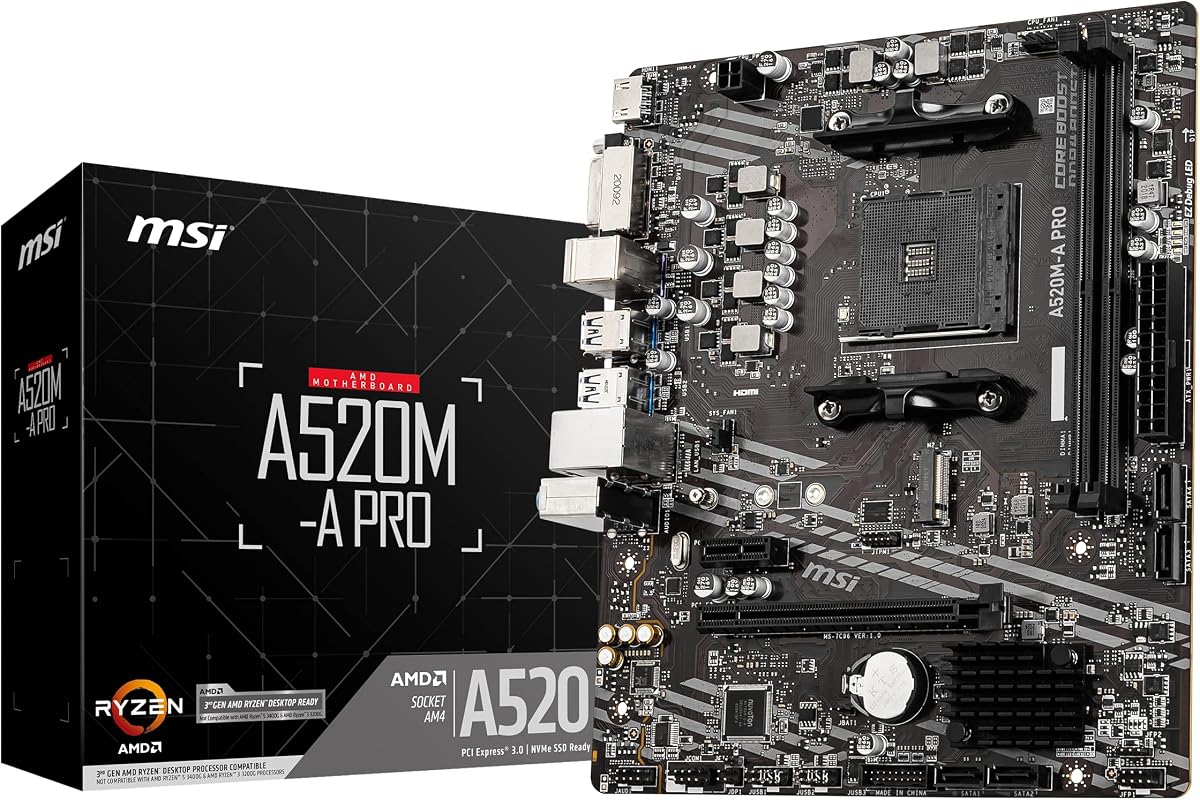
MSI A520M-A PRO is designed for users who need a no-fuss solution for basic computing tasks. It supports Ryzen 5000 and 4000 G-Series processors out of the box or with updates.
We may earn a commission when you buy through this link, at no additional cost to you.
The Turbo M.2 slot offers decent NVMe performance even if the PCIe lanes are limited to Gen 3. Audio Boost technology ensures that system sounds are clear, which helps for multimedia playback without a dedicated card.
It lacks the overclocking capabilities and advanced power delivery of B550 boards. This means it is best suited for non-overclocked parts or systems where power savings are more important than raw speed.
This board is ideal for office work or casual home use where budget is the primary concern. If you plan on gaming heavily, a B550 might be worth the small extra investment for future proofing.
Dragon Center software integrates MSI tools into one interface, making system monitoring and tweaking straightforward for new users.
Support for high-speed DDR4 memory up to 4600 MHz ensures your system remains responsive even with a budget-friendly chipset.
We may earn a commission when you buy through this link, at no additional cost to you.
ASRock B550M-HDV stands out because of its extensive video output options including HDMI, DVI-D, and D-Sub. This makes it a strong candidate for office setups or older monitors that need specific connection types.
We may earn a commission when you buy through this link, at no additional cost to you.
The 6-phase power design provides steady delivery for Ryzen 5000 processors. It also supports memory speeds up to 4733 MHz, which is impressive for a budget board and helps with system responsiveness.
You might notice it lacks USB-C and front audio headers common on other boards. This limits connectivity options for modern cases but keeps costs down for users who prefer simplicity.
Choose this if you have multiple displays or older monitors in your workflow. It balances cost with essential features like PCIe 4.0 and fast RAM support effectively.
Support for D-Sub VGA ensures compatibility with older projectors or monitors without needing expensive adapters or cables.
Six USB ports and Gigabit LAN provide ample connectivity for peripherals and reliable wired internet access without extra hubs.
We may earn a commission when you buy through this link, at no additional cost to you.
The MSI PRO B550M-P integrates smart thermal management with Frozr AI Cooling that adjusts fans based on CPU temperature. This feature helps keep noise levels low while maintaining stable performance during heavy loads.
We may earn a commission when you buy through this link, at no additional cost to you.
It supports PCIe 4.0 and has two M.2 slots for storage. This means you can install both a fast boot drive and a bulk storage drive without needing extra PCIe cards.
The lack of built-in Wi-Fi is a trade-off compared to higher tier models but keeps the price low. Users with Ethernet connections will not notice this limitation but wireless users will need an adapter.
This board is great for workstations where stability and storage speed matter more than flashy features. The AI cooling is a standout addition that enhances user experience significantly.
Frozr AI Cooling automatically optimizes fan speeds to keep your system quiet while preventing thermal throttling during intense tasks.
Dual M.2 slots allow you to utilize both Gen 4 and Gen 3 drives for a mix of speed and capacity in your storage setup.
We may earn a commission when you buy through this link, at no additional cost to you.
MSI B550M PRO-VDH WiFi earns our top spot because it bundles Wi-Fi into a budget-friendly package. This saves you money and installation hassle compared to buying separate network cards or adapters.
We may earn a commission when you buy through this link, at no additional cost to you.
Core Boost technology ensures that power delivery to your CPU is stable even under load. This stability is crucial for preventing crashes and ensuring your system runs smoothly during long gaming sessions.
The Flash BIOS Button lets you update firmware without needing a CPU installed which is a lifesaver for troubleshooting. However it lacks RGB headers which might disappoint users wanting visual customization.
We recommend this board for most buyers looking for a balance of modern connectivity and performance. It covers all essential bases without unnecessary bloat.
Integrated WiFi and Bluetooth remove the need for extra dongles and ensure stable connections for gaming and streaming.
Flash BIOS Button allows you to update the board before installing any other components making it easier to test compatibility.
We may earn a commission when you buy through this link, at no additional cost to you.
GIGABYTE B550 Gaming X V2 offers premium ATX features at a mid-range price point. It includes a front USB 3.2 Gen 1 Type-C header which makes connecting modern cases and peripherals very convenient.
We may earn a commission when you buy through this link, at no additional cost to you.
The 10+3 power phase design supports high-performance processors and overclocking. This ensures that even if you upgrade to a stronger CPU later the board will handle it without stability issues.
It supports RGB Fusion for synchronized lighting across compatible components. While this adds cost it is a huge plus for builders who care about aesthetics and visual consistency in their rig.
Choose this if you want to future proof your build with extra connectivity and power headroom. It is the best choice for a premium gaming build on a budget.
Front USB-C header allows you to connect fast devices directly to your case front panel without needing cables.
The robust VRM design ensures that power delivery stays consistent even when using high-wattage CPUs for demanding applications.
We may earn a commission when you buy through this link, at no additional cost to you.
Gigabyte A520M K V2 is designed for small cases where space is at a premium. The Micro-ATX layout ensures it fits in compact cabinets while still supporting DDR4 RAM upgrades.
We may earn a commission when you buy through this link, at no additional cost to you.
It offers basic connectivity with HDMI and essential USB ports. This makes it suitable for office PCs or media centers where advanced expansion is not required.
The lack of PCIe 4.0 means you may not get full speed from the latest SSDs or graphics cards. This is a trade-off for the smaller size and lower cost.
This board is ideal for small form factor builds where you want something simple and reliable. It gets the job done without breaking the bank.
Micro-ATX format allows you to build in smaller cases without sacrificing core performance or memory support.
Support for high speed DDR4 memory ensures that even budget systems can handle modern multitasking demands easily.
We may earn a commission when you buy through this link, at no additional cost to you.
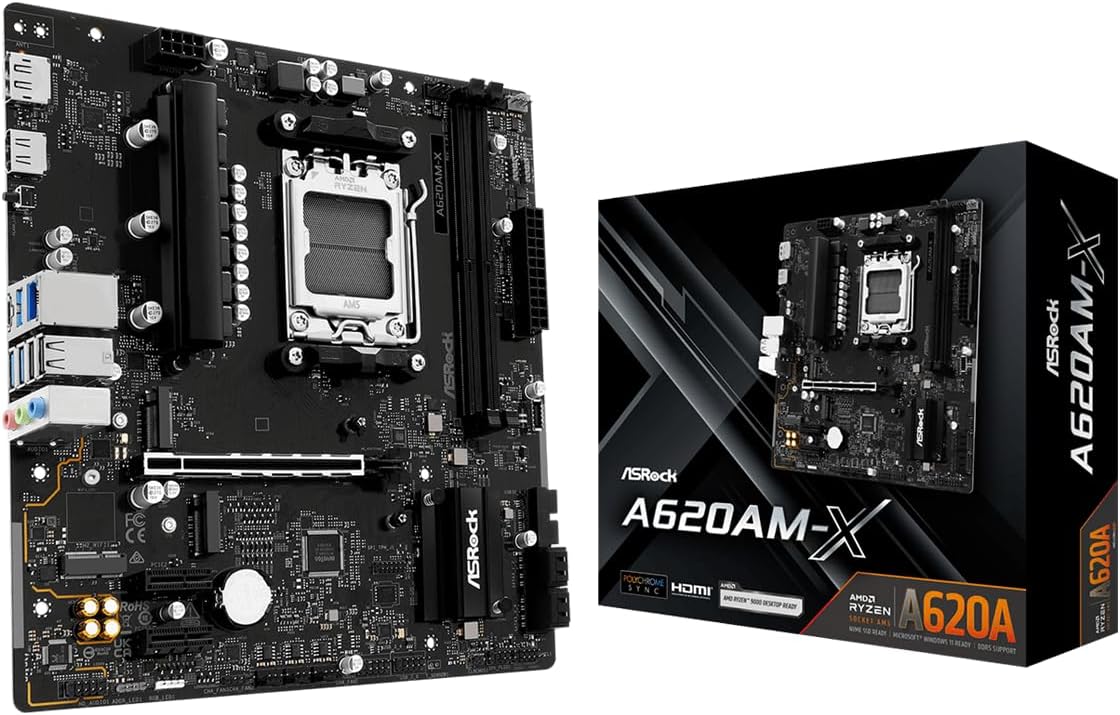
ASRock A620AM-X gives you access to the latest AM5 platform at a budget friendly price. It supports Ryzen 7000 and newer processors making it future proof for many years to come.
We may earn a commission when you buy through this link, at no additional cost to you.
It supports DDR5 memory up to 8000 MHz which is a huge jump in speed compared to DDR4. This ensures your system is ready for applications that demand high memory bandwidth.
The 2.5G LAN port provides faster wired connections than standard Gigabit networks. This is great for downloading large games or streaming without latency issues.
Buy this if you want to invest in the new AM5 platform without overspending. It balances cutting edge tech with affordable pricing well.
2.5G LAN offers significantly faster wired internet speeds than standard options helping you stay connected without lag.
Support for AM5 and DDR5 means you can upgrade your CPU and memory later without changing your motherboard again.
We may earn a commission when you buy through this link, at no additional cost to you.
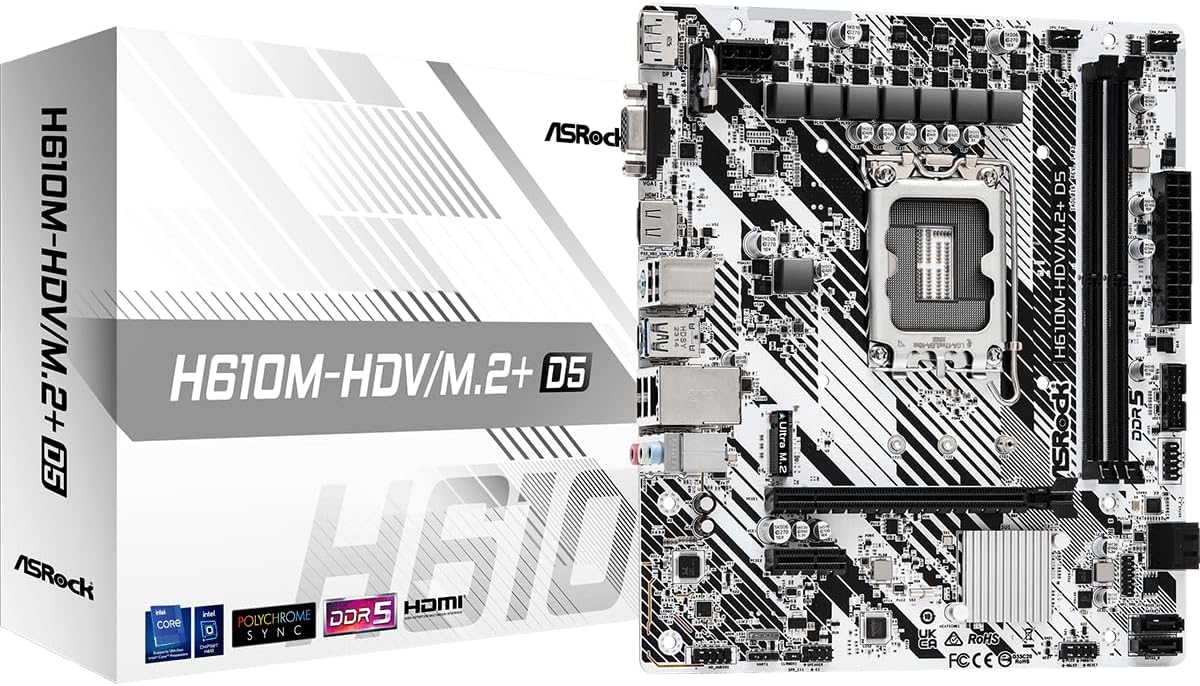
ASRock H610M-HDV/M.2+ D5 allows you to build an Intel system using fast DDR5 memory. It supports 12th 13th and 14th Gen Core processors providing good performance for general tasks.
We may earn a commission when you buy through this link, at no additional cost to you.
It includes HDMI and DisplayPort outputs which gives you flexibility for your monitors. This is a big plus if you need multiple screens or prefer one connection type over another.
It lacks some higher end features like PCIe Gen 4. USB-C which makes it better suited for basic use cases rather than gaming or heavy workloads.
This board is a great entry point for Intel users who want modern DDR5 speeds without spending too much. It is reliable and easy to install.
Support for DDR5 memory ensures your system benefits from higher bandwidth and faster speeds than older DDR4 generations.
Multiple video outputs allow you to connect different types of monitors easily without needing adapters for basic displays.
We may earn a commission when you buy through this link, at no additional cost to you.
Choosing a cheap motherboard requires balancing cost with essential features. We break down the key factors to consider so you can make an informed decision for your budget build.
The most critical step is ensuring the motherboard supports your CPU. For AMD this means checking if it uses AM4 for older Ryzen or AM5 for newer parts. Intel users must match LGA 1700 sockets to their processor generation.
Always verify the CPU support list on the manufacturer website before buying.
Cheap boards often dictate whether you use DDR4 or DDR5. DDR4 is cheaper and sufficient for most users but DDR5 offers higher speeds for future proofing. Ensure the board supports the memory type you plan to buy.
Check the maximum supported speed to avoid bottlenecks in your system performance.
Micro-ATX and ATX are the most common sizes. Micro-ATX is smaller and often cheaper fitting in more cases. ATX boards usually have more expansion slots and better cooling options.
Measure your case before buying to ensure the board fits physically.
Look for enough USB ports for your devices. USB 3.2 Gen 1 or higher is ideal for modern peripherals. Check for Ethernet, audio, and display ports based on your needs.
More ports usually mean you won't need to buy extra hubs.
Modern cheap boards should have at least one M.2 slot for NVMe SSDs. This slot connects to PCIe lanes and is faster than SATA drives. Multiple slots give you flexibility for extra storage.
Ensure the slot supports PCIe 4.0 if you want the fastest speed.
The Voltage Regulator Module ensures your CPU gets stable power. Budget boards may have fewer phases which limits overclocking. A decent VRM ensures stability without needing expensive upgrades.
Look for boards with at least 4 to 6 power phases for reliability.
Most cheap boards come with Gigabit LAN which is sufficient for most internet needs. Some higher value models include built-in Wi-Fi which saves money on separate adapters.
If you need wireless you should check for Wi-Fi modules on the board.
For gaming you need a primary PCIe x16 slot for your graphics card. Cheap boards usually support PCIe 4.0 now but check the lane count. Additional slots help with capture cards or sound cards.
Ensure the slot works with your GPU size and speed requirements.
Install the board by first placing standoffs in the case to prevent short circuits. Carefully align the ports and secure the board with screws. Insert the CPU and apply thermal paste before mounting the cooler.
Connect the power cables including the main 24 pin and CPU 8 pin connectors. Plug in your GPU and storage drives ensuring cables are neatly routed for airflow. Double check all connections before applying power.
Update the BIOS to the latest version for stability and CPU support. Use the manufacturer utility to tune fan speeds and settings. Keep the system dust free and check temperatures regularly to avoid overheating.
Yes many cheap motherboards support high-end CPUs and GPUs well. They provide stable power delivery and modern connectivity like M.2 slots which are enough for gaming. The main trade-offs are usually fewer aesthetic features or overclocking options.
AM4 is cheaper and sufficient for most users right now. AM5 is the future but is more expensive. Choose AM4 if you are on a budget or AM5 if you plan to upgrade soon.
Check the manufacturer website for the latest BIOS files. Download and put them on a USB drive then enter the BIOS menu to flash. Some boards have a button on the back to update without a CPU installed.
Yes most cheap boards support adding more RAM sticks. Ensure you buy matching speed and type. Check the maximum memory limit on the board specs before buying.
Indirectly it can. A stable board ensures your CPU and GPU run consistently without throttling. However the difference between a cheap and expensive board is often small unless you are overclocking.
Most manufacturers offer at least a three year warranty on motherboards. Check the specific brand policy for details on returns and support.
We reviewed ten excellent options ranging from legacy H61 boards to modern AM5 models. The GIGABYTE B550M K stands out as the top pick for tight budgets while the MSI B550M PRO-VDH WiFi offers the best value for modern users.
Prioritize compatibility and stability over fancy features. A board that matches your CPU and RAM needs will serve you well regardless of price. Consider future upgrades when choosing between DDR4 and DDR5 platforms.
Prices change frequently so always check the current listing before buying. We hope this guide helps you build a reliable system without overspending on your next computer.