
WALI Computer Monitor Stand for Desk
4.7Editor score
Supports up to 44 lbs
Ventilated platform design
Under-stand storage space
Finding the right laptop riser can transform your daily workflow by improving posture and reducing strain on your neck and back. A quality stand elevates your screen to eye level, promoting a healthier sitting position during long work sessions. This guide explores the best options available to help you upgrade your workspace efficiently.
We evaluated ten top-rated laptop risers based on stability, material quality, adjustability, and compatibility with various device sizes. Our analysis focuses on ergonomic benefits, cooling capabilities, and portability to ensure you find a stand that meets your specific needs. Whether you work from home or travel frequently, these selections cover diverse use cases.
Each pick in this list highlights unique features such as rotating bases, telescopic heights, or heavy-duty construction for larger devices. You will find detailed breakdowns of pros and cons to help you make an informed decision without confusion. Please note that prices and availability may change over time, so check current listings before purchasing.
4.7Editor score

4.8Editor score
4.7Editor score
As an Amazon Associate we earn from qualifying purchases.
This side-by-side comparison highlights the key specifications and features of the top ten laptop risers on the market. We focus on weight capacity, material composition, adjustability options, and compatibility ranges to help you quickly identify the right fit for your device and workspace needs.






The BESIGN LS03 Aluminum Laptop Stand stands out as the top choice for most users seeking a reliable and ergonomic solution. With a high user rating of 4.8, it delivers consistent performance by elevating your laptop by six inches to improve posture. This stand is designed to fit most standard laptops between 10 and 15.6 inches, making it a versatile option for daily work.
We may earn a commission when you buy through this link, at no additional cost to you.
Its premium aluminum alloy construction ensures durability while remaining lightweight enough for desk use. The open design not only looks sleek but also facilitates airflow to keep your device cool during intensive tasks. Rubber pads on the holder hands keep the laptop stable and prevent scratches, ensuring your device remains in pristine condition while you type.
While the stand offers excellent stability, the fixed height means you cannot adjust the angle without moving your desk or using external accessories. Additionally, the silver finish might show minor scratches over time depending on usage habits. These trade-offs are minimal given the overall quality and ergonomic benefits provided at this price point.
For anyone looking to reduce neck strain and organize their desk space, this stand is an ideal purchase. It works seamlessly with MacBook Air and Pro models as well as Windows laptops from Dell and HP. We recommend it for home office setups where a permanent, high-quality riser is preferred over portable options.
Raising your screen to eye level reduces the need to look down, which minimizes neck and shoulder strain during long work sessions.
The open aluminum design allows air to circulate freely around the laptop bottom, preventing overheating and maintaining optimal performance.
We may earn a commission when you buy through this link, at no additional cost to you.
The Lamicall Aluminum Laptop Stand offers exceptional flexibility for users with larger devices or varying workspace needs. Rated at 4.7, it supports laptops from 10 up to 17.3 inches, covering almost all modern notebooks. Its adjustable design allows you to fine-tune the height and angle for maximum comfort during extended typing sessions.
We may earn a commission when you buy through this link, at no additional cost to you.
Construction quality is a key strength here, with a large aluminum alloy base that adds significant weight to prevent wobbling. This stability is crucial when typing vigorously, ensuring your laptop stays secure. The foldable feature makes it easy to pack for business trips or store away when not in use at home.
While the material quality is excellent, the price is slightly higher than simpler fixed stands. The foldable hinge adds complexity which could be a point of wear over many years of travel. However, these factors are balanced by the convenience of adjustability and the robust build quality that protects your investment.
This stand is perfect for professionals who travel frequently or use multiple laptop sizes. Whether you have a MacBook Pro or an Alienware gaming laptop, the compatibility range ensures a secure fit. We suggest it for those who value versatility and need a stand that adapts to different environments easily.
Accommodating devices from 10 to 17.3 inches means you can switch between different laptops without needing multiple stands.
The upgraded large base improves stability significantly, preventing the stand from sliding across your desk during heavy typing.
We may earn a commission when you buy through this link, at no additional cost to you.
The LOXP Adjustable Laptop Stand brings a unique feature to the table with its 360-degree rotating base, allowing you to share your screen easily. Rated at 4.6, it combines this functionality with a durable one-piece fiber metal material that offers stability comparable to traditional aluminum stands. It fits laptops from 10 to 16 inches effectively.
We may earn a commission when you buy through this link, at no additional cost to you.
The rotating base is a standout benefit for collaborative work or presentations where you need to show your screen to others without moving the laptop. The upgraded rotating base design ensures that even with movement, the stand remains stable. Anti-slip silicone protects your laptop from sliding or scratching during these transitions.
However, the rotation mechanism adds mechanical complexity which could be a potential point of failure over time compared to simpler stands. Additionally, the compatibility limit of 16 inches excludes larger gaming laptops that might need more support. These are minor issues if your devices fit within the supported size range.
We recommend this stand for creative professionals or educators who need to share their screen frequently. The foldable design also makes it convenient for those who move their workspace around often. If you want a functional riser that adds a layer of interaction, this is a strong candidate to consider.
The 360-degree rotation allows you to quickly turn the screen toward a colleague or client for better communication.
One-piece fiber metal material provides robust support and durability, ensuring the stand withstands daily usage without bending.
We may earn a commission when you buy through this link, at no additional cost to you.
The Nulaxy Ergonomic Adjustable Laptop Stand is engineered for robust performance with a dual-rod mechanism that ensures zero wobbling. With a rating of 4.7, it supports heavy-duty devices up to 22 lbs, making it one of the strongest options available. Its advanced heat vent design promotes airflow to protect your laptop from overheating during intensive tasks.
We may earn a commission when you buy through this link, at no additional cost to you.
This stand uses a geometric heat-vent design on the upper panel that is superior to standard solid stands. This continuous dissipation is vital for gaming laptops or machines used for video editing where thermal throttling can occur. The dual-foldable design allows it to collapse flat for easy storage in a backpack.
Despite its strengths, the dual-rod construction adds weight which might not be ideal for frequent travelers. The price point is also slightly higher due to the specialized engineering involved in the stability mechanism. These trade-offs are acceptable if you prioritize stability and cooling performance over minimal weight.
For users with heavier laptops who need reliable posture correction, this stand is an excellent investment. It works well with MacBook Pro and larger Windows machines up to 16 inches. We suggest it for home offices where the stand stays in place most of the time and durability is a priority.
The dual-rod mechanism distributes weight effectively, ensuring a 100% wobble-free experience even when typing vigorously on heavy devices.
Unique geometric vents create better airflow than solid panels, helping to maintain optimal operating temperatures under heavy load.
We may earn a commission when you buy through this link, at no additional cost to you.
The Amazon Basics Sturdy Laptop Stand offers a reliable entry point for those needing a simple and adjustable riser without breaking the bank. Rated at 4.6, it supports laptops from 10 to 15.6 inches and provides up to 7 inches of height adjustment. Its lightweight aluminum construction makes it easy to move around the office.
We may earn a commission when you buy through this link, at no additional cost to you.
The hollow ventilation design ensures that your laptop stays cool by allowing air to circulate freely underneath. It is also portable enough to fit easily into most laptop bags for travel. Non-slip silicone pads protect your device from sliding and keep the stand secure on flat surfaces.
However, it supports up to 11 lbs which is lower than some heavy-duty options on this list. The construction feels slightly less substantial compared to models with thicker bases, which could affect stability with very heavy laptops. These factors are balanced by the reasonable price and solid functionality for everyday tasks.
We recommend this stand for students or home workers who need a cost-effective and functional solution. It pairs well with standard ultrabooks and MacBooks. If you need a basic riser to improve ergonomics without investing in high-end features, this is a practical and efficient choice.
Delivering essential ergonomic benefits at a competitive price point makes this an attractive option for general office needs.
Up to 7 inches of height adjustment allows you to find a comfortable viewing level that suits your specific desk setup.
We may earn a commission when you buy through this link, at no additional cost to you.
The WALI Computer Monitor Stand is built for robustness with a capacity to support up to 44 lbs, making it suitable for large laptops or even monitors. Rated at 4.7, it offers adjustable height levels to create a comfortable viewing position. Its large metal shelf provides ample space for various devices including printers.
We may earn a commission when you buy through this link, at no additional cost to you.
One of its key features is the open space beneath the stand which allows you to store keyboards or notebooks. This helps reduce desktop clutter and maximizes your workspace efficiency. The vented holes platform ensures that any device placed on top stays cool during operation preventing overheating.
On the downside, this stand is not foldable and takes up more space than slim laptop-only risers. It is designed more for permanent desk setups than travel. However, the stability and storage benefits make it worth the trade-off for static workstations needing extra organization.
We recommend this stand for users who need to support heavier devices or want to save desk space. It works well in office settings where multiple accessories need to be organized. If you prioritize a sturdy platform that doubles as storage, this is a highly functional option to consider.
The open shelf underneath provides dedicated storage for peripherals, helping you keep your desk tidy and organized.
Supporting up to 44 lbs means you can confidently place even large gaming laptops or small monitors on this platform.
We may earn a commission when you buy through this link, at no additional cost to you.
The Lamicall Aluminum Laptop Stand Pro builds on the brand's reputation with added features like a 360-degree rotation base and dual screen compatibility. Rated at 4.7, it supports laptops from 10 to 17.3 inches and includes a heavy base to ensure stability. This design helps maintain ergonomic posture when working with multiple displays.
We may earn a commission when you buy through this link, at no additional cost to you.
Its ability to rotate allows for easy screen sharing during meetings or presentations without moving the entire device. The stand also functions as a projector mount which adds versatility to its primary role. High quality aluminum alloy ensures that the stand cools the laptop effectively through its design.
The higher price reflects the added features which may not be essential for every user. Some might find the rotation unnecessary if they only use the laptop in one spot. However, for those who collaborate often, this functionality provides significant convenience and workflow improvements.
We recommend this stand for business professionals who need to present content frequently. It also suits home offices where matching a laptop height to an external monitor is important. If you value extra features like rotation and projection support, this stand offers a comprehensive solution.
Rotating the screen allows you to present your work to others quickly without disrupting your typing setup.
Adjustable angles help keep both screens at the same height, reducing neck strain when switching between devices.
We may earn a commission when you buy through this link, at no additional cost to you.
This Adjustable Laptop Stand stands out for its portability and ultra-lightweight design, weighing only 0.49 pounds. Rated at 4.5, it offers six levels of height adjustment to find the perfect angle for your eyes. Its folded size is tiny making it easy to slip into a laptop bag without adding bulk.
We may earn a commission when you buy through this link, at no additional cost to you.
The triangle support design provides stability relative to its weight ensuring the laptop stays secure. Open design ventilation helps keep your device cool during use. Smooth edges ensure that handling the stand does not hurt your hands even when setting it up quickly.
However, the lightweight construction means it might wobble slightly compared to heavier stands. The weight capacity is lower so it is not suitable for very heavy devices. These limitations are acceptable given the primary goal of portability and convenience for travelers.
We recommend this stand for frequent travelers who need an ergonomic setup on the go. It is ideal for working in cafes or hotels where desk conditions vary. If you prioritize saving space and weight in your bag this is a practical and affordable choice.
Weighing under half a pound ensures you can carry this stand anywhere without feeling the burden in your bag.
Six height levels allow you to adjust the stand quickly to suit different seating positions and desk heights.
We may earn a commission when you buy through this link, at no additional cost to you.
This Adjustable Laptop Stand focuses on durability with a sturdy metal construction that supports up to 17.6 lbs. Rated at 4.6, it fits laptops from 10 to 15.6 inches and offers multiple ventilation holes to keep devices cool. Rubber mats on the hooks ensure your device stays secure and scratch free.
We may earn a commission when you buy through this link, at no additional cost to you.
The metal build provides a solid feel that resists bending over time. Foldable design allows you to store it away easily when not in use. It is a practical solution for office desks where stability and protection are more important than aesthetic flair.
The basic design might look less refined compared to aluminum stands with brushed finishes. Fixed width adjustments could be limiting for extremely large or small devices outside the range. However, the functional benefits of strength and protection outweigh these cosmetic considerations for many users.
We recommend this stand for users who prioritize durability and budget. It works well for standard laptops and Chromebooks. If you need a reliable stand that protects your device and offers solid support without frills this is a strong candidate.
The metal hooks and rubber mats work together to hold your laptop securely while preventing scratches on the device.
Multiple ventilation holes ensure air flows through the stand reducing heat buildup during prolonged usage periods.
We may earn a commission when you buy through this link, at no additional cost to you.
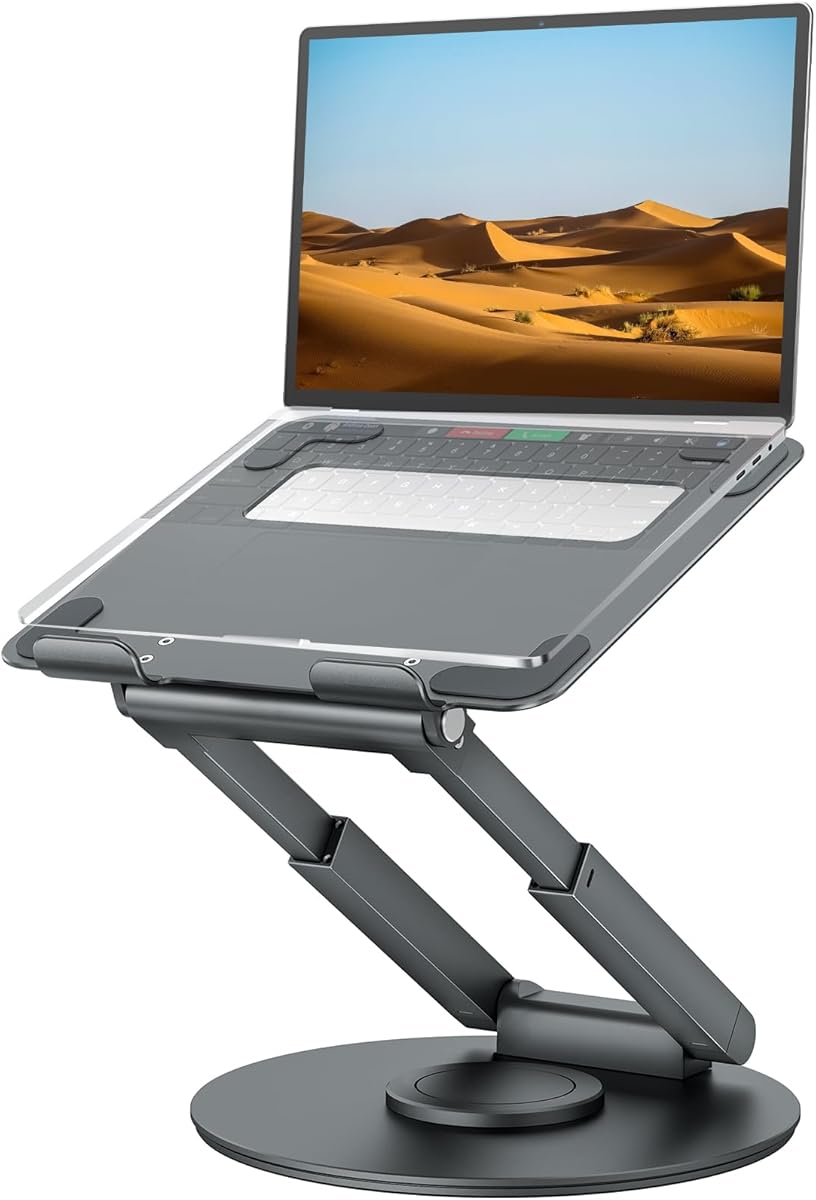
The tounee Telescopic Laptop Stand offers a premium experience with full sit to stand capability allowing you to switch posture instantly. Rated at 4.7, it adjusts from 2.1 to 21 inches which covers sitting and standing desk heights. Its solid aluminum base supports up to 22 lbs ensuring stability even when fully extended.
We may earn a commission when you buy through this link, at no additional cost to you.
A 360-degree swivel base allows you to rotate the screen for face to face chats without moving the stand. This feature combined with the height adjustment makes it a versatile tool for modern active workstations. The sturdy build ensures it remains secure even with heavy laptops attached.
The main trade-off is the price which is higher than any other model in this guide. The extended height also requires sufficient desk depth to avoid bumping into it. These factors are worth considering if you want a dedicated sit-stand solution without buying a full electric desk.
We recommend this stand for health-conscious professionals who want to alternate between sitting and standing. It is an excellent upgrade for those who spend long hours at the desk. If you want a complete ergonomic solution that adapts to your movement this stand is the top choice.
Switching between sitting and standing during the day helps reduce muscle tension and increases overall productivity levels.
The wide range from 2.1 to 21 inches ensures compatibility with most desks and ergonomic needs regardless of your posture.
We may earn a commission when you buy through this link, at no additional cost to you.
Selecting the right laptop riser involves considering several key factors that impact your workflow and comfort. This guide breaks down the essential elements to help you make an informed choice.
Ensure the riser supports the size of your laptop. Most stands fit between 10 and 16 inches but some options handle up to 17.3 inches. Check the width and depth limits to confirm your device sits securely.
Always verify the compatibility range before buying to avoid purchasing a stand that is too small for your device.
Laptops vary in weight and heavier gaming models need robust support. Look for a stand with a capacity well above your laptop's weight to prevent wobbling. Most quality stands support at least 8 to 11 pounds.
Choose a model with a high weight capacity to ensure stability during typing and extended use.
Aluminum and metal alloy stands offer better durability and heat dissipation than plastic models. The material should be sturdy enough to hold your laptop without bending. Smooth edges and non-slip pads are essential to protect your device.
Prioritize metal construction for a longer lasting and safer experience for your laptop.
An ergonomic riser elevates your screen to eye level to reduce neck strain. Adjustable stands allow you to fine-tune height and angle for comfort. Fixed stands are easier to use but offer less flexibility.
Select an adjustable model if you need specific height settings to maintain a healthy posture throughout the day.
If you travel often choose a foldable and lightweight stand that fits in your bag. Fixed desks are better for permanent office setups where weight is less of a concern. Check folded dimensions to ensure it fits your storage space.
Opt for a foldable design if you plan to carry your stand between locations regularly.
Open designs with vents help dissipate heat from your laptop during intensive tasks. Closed designs might trap heat and reduce performance over time. Look for stands with hollow centers or ventilation holes.
Choose a stand with a well-ventilated design to prevent your laptop from overheating.
A stable stand is crucial for smooth typing and typing without shaking. Dual rod designs and heavy bases contribute significantly to stability. Read reviews regarding wobble to ensure a steady typing experience.
Look for features like heavy bases or dual hinges to minimize movement during use.
Some stands offer rotating bases or sit to stand capabilities for advanced workflows. These features add value but also increase the price. Consider what extra functions you need before upgrading.
Evaluate if features like rotation or telescopic height are necessary for your specific work habits.
When setting up your laptop riser, start by placing it on a flat and stable surface. Ensure all locking mechanisms are engaged before placing your laptop on the stand to prevent accidental slipping or tipping.
Adjust the height so that the top of your screen is at or slightly below eye level. This position encourages a neutral spine position reducing strain on your neck and shoulders during long work sessions.
Regularly clean the rubber pads and the surface of the stand with a dry cloth to maintain grip. If the stand is foldable, collapse it carefully and store it in a cool dry place to avoid damage.
Yes, a laptop riser elevates the screen to eye level which encourages you to sit up straight. This reduces the need to hunch forward and helps prevent neck and back pain over time.
Most metal stands with open designs promote better airflow around your laptop. This helps dissipate heat more effectively than placing the laptop directly on a desk.
Absolutely, using a riser allows you to keep the screen at eye level while using an external keyboard. This setup provides a full ergonomic workspace similar to a desktop computer.
Most stands are designed to fit a wide range of laptops from 10 to 16 inches. Always check the compatibility limits in the product specs to ensure it supports your specific model size.
Weight capacity varies by model with some supporting up to 22 lbs. Choose a stand that exceeds your laptop's weight to ensure stability and safety during use.
Most stands require minimal to no assembly with foldable designs snapping into place quickly. They are designed to be user-friendly so you can start using them immediately.
We have explored ten excellent options ranging from budget-friendly portable stands to premium adjustable risers. Each selection offers unique benefits designed to improve your workspace ergonomics and productivity.
Prioritize features like stability adjustability and material quality to find a stand that suits your daily routine. A good riser is an investment in your health and long term comfort.
Remember to check current prices and availability before purchasing since these details may change. We hope this guide helps you find the perfect laptop riser for your needs.