
Upgraded Watt Power Meter Plug
4.6Editor score
7 display modes
Overload protection
Data memory function
This guide compares the top energy consumption monitors for PC to help you track usage, reduce bills, and optimize your home or office electricity efficiency
Monitoring your computer and home energy usage is essential for reducing bills and improving efficiency. The right monitor provides real-time data to help you identify power hogs and optimize consumption patterns effectively.
We evaluated ten top-rated devices based on accuracy, features, ease of use, and value. Our selection includes smart plugs, whole-home monitors, and dedicated watt meters suitable for various needs and budgets.
Each pick showcases key specs, pros, and cons to help you decide quickly. Note that prices fluctuate frequently, so verify current costs on Amazon before making your final purchase decision today.
4.6Editor score

4.6Editor score

4.3Editor score
This side-by-side comparison highlights key specifications across all ten selected energy monitors, helping you quickly identify the best match for your specific power tracking needs and budget.


The Emporia Vue 3 is a highly rated whole-home energy monitor designed to track electricity usage with precision. It holds a 4.6-star rating and offers reliable performance for households looking to optimize their power consumption habits.
We may earn a commission when you buy through this link, at no additional cost to you.
Its standout quality is the ability to provide real-time data for individual circuits through sixteen 50A sensors. This allows you to identify high-power PC setups or other appliances consuming excessive electricity without guesswork.
A trade-off is that it requires a stable 2.4GHz WiFi connection to function effectively, which may be limiting in some network environments. Additionally, installation inside a circuit panel often benefits from professional help for safety.
If you need detailed, circuit-level insights to lower electric bills, this monitor is a top recommendation. Its UL certification and robust app features make it a trustworthy choice for serious energy tracking.
Sixteen sensors allow you to pinpoint exactly which devices are driving up your usage.
UL certification ensures all components meet rigorous safety standards for home electrical use.
We may earn a commission when you buy through this link, at no additional cost to you.
This watt meter plug offers an incredibly affordable way to monitor individual device usage. With a 4.6-star rating, it provides essential metrics like watts, volts, and kWh on a large, backlit screen for easy reading.
We may earn a commission when you buy through this link, at no additional cost to you.
Its key strength lies in its seven distinct display modes, allowing you to view power, cost, or time metrics instantly. The adjustable backlight and wide viewing angle make it practical for dark setups where your PC sits.
However, it lacks smart features like app connectivity, meaning you must check the physical display to see data. It also supports only one outlet, so you cannot monitor multiple devices simultaneously without buying extra units.
For anyone seeking a simple, low-cost solution to check PC power draw, this plug is highly recommended. It delivers accurate basics without complexity, making it ideal for budget-conscious users.
The large LCD with backlight ensures you can read numbers clearly in any lighting condition.
Built-in overload protection warns you if connected devices exceed safe power limits.
We may earn a commission when you buy through this link, at no additional cost to you.
The Meross Smart Home Energy Monitor is designed for tech-savvy users who prioritize privacy and automation. It holds a 4.3-star rating and features ETL certification for safe, reliable operation in your home electrical panel.
We may earn a commission when you buy through this link, at no additional cost to you.
Its standout quality is the ability to keep data local via Home Assistant integration, ensuring no cloud delays or privacy concerns. This allows for custom automations, such as powering PC rigs when solar energy is available.
The main trade-off is the higher price point compared to simpler plugs and the complexity of initial setup. Configuring circuits and local servers requires technical knowledge that some users might find challenging.
If you value data privacy and want to integrate energy monitoring into a smart home ecosystem, this is the top choice. It offers premium features that justify the cost for advanced users.
All energy data stays local, giving you full control without relying on external servers.
Automatically switches high-power appliances to solar power when excess energy is available.
We may earn a commission when you buy through this link, at no additional cost to you.
SURAIELEC offers a compact watt meter that provides solid accuracy for monitoring PC and appliance usage. With a 4.5-star rating, it features a Class 1.0 standard ensuring precise readings across a wide voltage range.
We may earn a commission when you buy through this link, at no additional cost to you.
Its standout quality is the built-in rechargeable battery backup that stores data for up to 90 days. This ensures you never lose historical usage data even if there is a power outage or you unplug the device.
The trade-off is that it lacks remote connectivity, meaning you can only check data physically at the outlet. While reliable, it doesn't offer the automation or remote access found in smarter alternatives.
For users needing a rugged, accurate plug-in monitor with long memory, this is a strong option. Its compact design also keeps the lower outlet accessible for other devices when plugged in.
Battery-backed memory retains data for months without power or internet access.
Works across 90-250V, making it versatile for different regional power standards.
We may earn a commission when you buy through this link, at no additional cost to you.
This monitor provides complete home coverage with sixteen 50A sensors included in the box. It holds a 4.4-star rating and is ideal for tracking high-power PC setups alongside other heavy appliances in the home.
We may earn a commission when you buy through this link, at no additional cost to you.
Its standout quality is the privacy mode allowing it to run on a local server without internet. This ensures your usage data remains secure and accessible only to your own network or MQTT setup.
The trade-off is the physical installation requirement inside your circuit panel, which demands some electrical expertise. Additionally, the price point is higher than basic plug-in solutions.
If you need to track multiple circuits or manage shared energy costs, this is an excellent choice. It balances privacy with detailed, real-time tracking across your entire home.
Sixteen sensors let you monitor individual rooms or high-load circuits separately.
Run entirely on your local network for maximum data privacy and control.
We may earn a commission when you buy through this link, at no additional cost to you.
This HBN plug offers nine distinct display modes to track watts, VA, kWh, and more. With a 4.6-star rating, it provides a wide viewing angle so you can read the display from almost any position.
We may earn a commission when you buy through this link, at no additional cost to you.
Its standout quality is the detailed variety of metrics, including power factor and frequency, helping you understand device efficiency beyond just wattage. The data storage ensures you don't lose totals during unexpected power outages.
However, it is rated for 125VAC, which may limit use with higher-voltage appliances. The auto-turnoff feature for the backlight is energy-saving but means you have to press a button to read data at night.
For a plug that balances features with affordability, this is a solid pick. It works well for PCs and gaming rigs within the voltage limits.
Track nine different electrical parameters for a complete view of device usage.
A 160-degree viewing angle ensures data is legible from side angles.
We may earn a commission when you buy through this link, at no additional cost to you.
The KETOTEK plug boasts an impressive 4.7-star rating for its user-friendly interface. It offers one-click switching to access key parameters like voltage, current, and cost instantly without complex menus.
We may earn a commission when you buy through this link, at no additional cost to you.
Its standout quality is the high overload capacity of 3680W, making it suitable for powerful gaming rigs or workstations. You can also set custom alarms to alert you if usage exceeds thresholds.
A trade-off is that it operates entirely locally without cloud storage, so you must read data directly from the device. This limits remote monitoring capabilities but keeps the system simple and secure.
If you want a high-quality, straightforward plug with excellent build quality, this is a great option. It is ideal for monitoring PC loads directly at the socket.
Dedicated buttons let you switch between metrics with a single press.
Set your own alarms for power or cost limits to manage usage actively.
We may earn a commission when you buy through this link, at no additional cost to you.
This product offers two meters for the price of one, providing excellent value for tracking multiple devices. It holds a 4.6-star rating and features a durable ABS body that resists wear and fire hazards.
We may earn a commission when you buy through this link, at no additional cost to you.
Its standout quality is the bundled quantity, allowing you to monitor your PC and another high-consumption appliance simultaneously. The eight display modes cover all necessary metrics for cost calculation and power monitoring.
The trade-off is similar to other basic plugs: there is no remote data access, so you must visit the outlets to check readings. Backlight timing is also fixed rather than customizable.
If you need to monitor more than one device cheaply, this bundle is the best choice. It is perfect for PC and peripheral setups like monitors or cooling systems.
Get two reliable meters to track multiple devices at once without extra cost.
Fire-resistant ABS construction ensures safety during continuous power usage.
We may earn a commission when you buy through this link, at no additional cost to you.
The Kill A Watt is a classic device known for its durability and simplicity. It monitors electrical usage across day, week, month, or year intervals, making it useful for long-term PC power analysis.
We may earn a commission when you buy through this link, at no additional cost to you.
Its standout quality is its straightforward design: plug it in and read the large LCD display to see consumption and costs. It works with inverters and standard 115-volt appliances, ensuring broad compatibility.
The trade-off is that it lacks smart connectivity, meaning data is not accessible remotely or via app. It is also limited to four basic settings, which might not suit detailed analysis needs.
For a no-nonsense, time-tested solution for tracking usage, this device remains a solid option. It is particularly good for users who prefer simple, analog-style feedback.
A proven design that continues to provide reliable usage data without complications.
Switch between day, week, or month views to understand long-term usage patterns.
We may earn a commission when you buy through this link, at no additional cost to you.
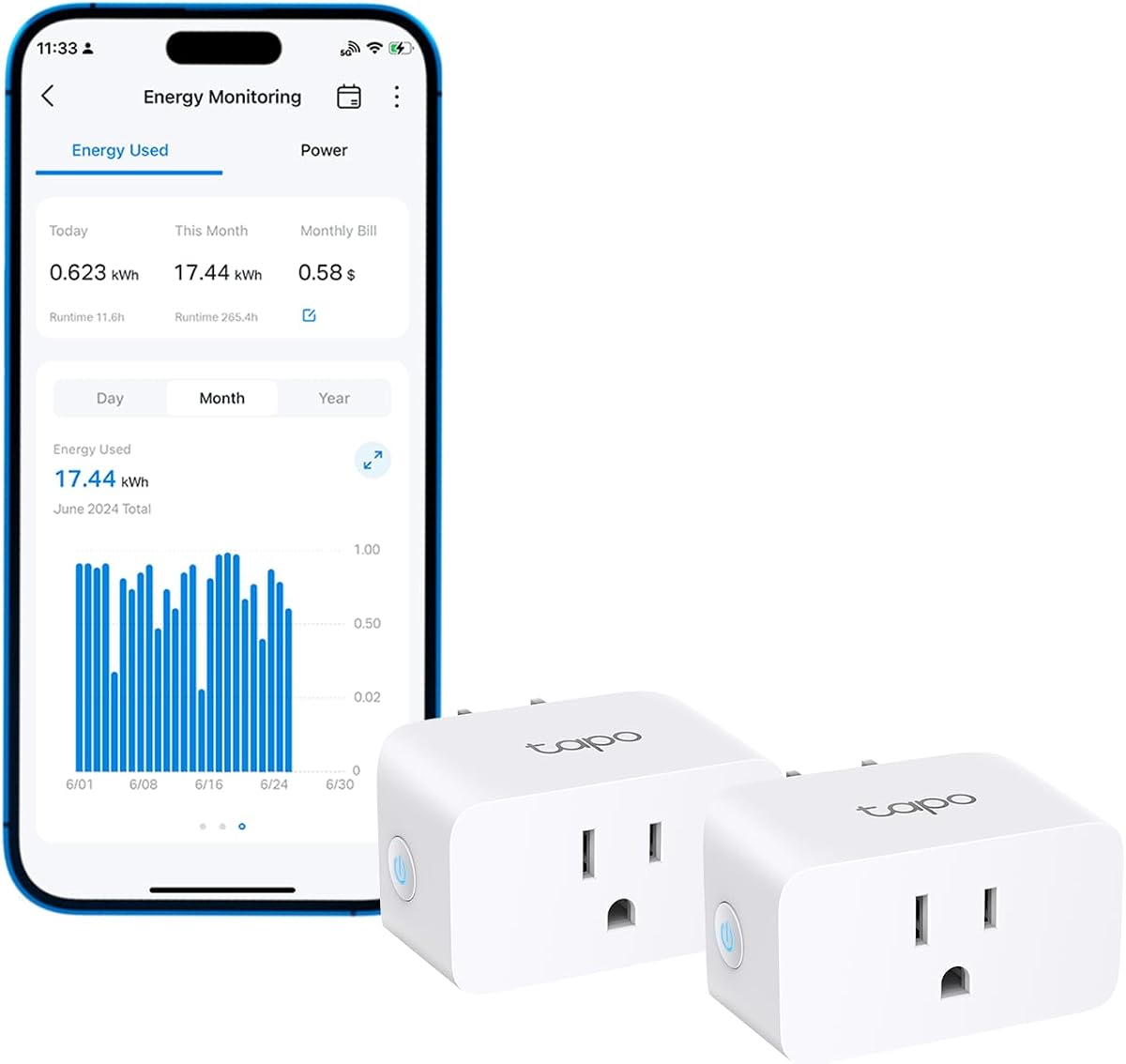
The Tapo P115 offers smart tracking with Wi-Fi connectivity for remote monitoring. It holds a 4.5-star rating and allows you to manage usage via voice commands with Alexa or Google Assistant.
We may earn a commission when you buy through this link, at no additional cost to you.
Its standout quality is the integration with smart home scheduling to reduce bills automatically. You can set devices to power down or operate during off-peak hours directly from the app.
The trade-off is a dependency on Wi-Fi for remote features, which can be inconvenient if your network goes down. Also, the 15A limit may not support very high-power PC setups or peripherals.
If you want smart automation and remote access for moderate loads, this is a great choice. It works well for PC monitors, routers, or standard towers.
Control and track energy usage from anywhere via the intuitive Tapo app.
Schedule operation during off-peak hours to reduce electricity costs automatically.
We may earn a commission when you buy through this link, at no additional cost to you.
Choosing the right monitor depends on whether you need smart features, whole-home data, or simple plug-in tracking. Below are the key factors to consider for optimal selection.
If you want to track PC usage remotely, choose models with Wi-Fi or app support. Smart plugs like Tapo offer automation, while whole-home monitors enable detailed remote insights without visiting the device.
Prioritize Wi-Fi models for convenience and remote access.
Look for monitors with at least 1% to 2% accuracy to ensure reliable readings. Devices labeled with Class 1.0 standards or ETL/UL certification often deliver higher precision for billing and analysis.
Accuracy ensures your power usage data reflects real costs.
Plug-in meters are easiest for PCs and single devices, while panel-based monitors require electrical work for whole-house tracking. Choose based on whether you need a single device or whole-home visibility.
Plug-in is simple; panel install requires expertise.
Models with large LCDs and backlighting help you read values in low light. Some use apps with graphs for trends, while others require manual button presses to cycle through metrics on the device.
Good display ensures you can check data easily.
Check if the monitor retains data during power outages. Cloud-connected devices store historical logs indefinitely, while standalone plugs may have internal memory ranging from days to months.
Memory helps you track long-term usage trends reliably.
Ensure the device supports your local voltage (120V or 220V) and the total wattage of your PC. High-end rigs may exceed 1800W, requiring monitors rated up to 3680W for safety.
Avoid overload by checking voltage and wattage ratings.
For smart home enthusiasts, look for compatibility with Home Assistant or voice assistants. This allows you to automate PC shutdowns or track usage without manually checking displays.
Integration saves effort by automating power management.
Prices range from under $20 for plugs to over $150 for whole-home systems. A longer warranty, like two years, adds confidence for more expensive devices used continuously with high-power PCs.
Balance budget with expected longevity and support.
To start, plug the monitor between your wall outlet and your PC power cord. Wait for the device to initialize and ensure the display is active or the app is connected.
Observe the real-time wattage to see your PC usage under load. Use the display or app to log cumulative consumption over days to estimate monthly energy costs.
Keep the device in a well-ventilated area to prevent overheating. Periodically check for firmware updates if supported and reset cumulative data when starting a new tracking period.
Yes, plug-in monitors are compatible with standard PC power supplies. Ensure the monitor's wattage rating exceeds your PC's peak draw, typically around 500W to 1000W for gaming systems.
Whole-home monitors track multiple circuits, but plug-in meters are limited to one outlet. To monitor multiple devices, use multiple plug-in units or a system designed with branch circuits.
Most plug-in meters work offline without internet. Smart monitors need internet for remote access, but many offer local storage or LAN-only options if internet is unavailable.
They are typically accurate within 1 to 2 percent, which is close enough to verify billing. Some variance may occur due to utility meter calibration or power factor differences.
Use the real-time display or app to switch between idle and loaded states. Compare readings manually to estimate how much power gaming or workloads consume versus sleep mode.
Yes, reputable monitors like those with UL or ETL certification are designed for 24/7 use. Ensure you follow load limits and install panel units correctly to avoid overheating risks.
We reviewed ten top options, from simple plugs to advanced smart systems. The Emporia Vue 3 leads for whole-home detail, while budget plugs like Upgraded Watt offer excellent single-device tracking.
Prioritize your specific needs: smart automation, accuracy, or cost. If you need remote access, opt for Wi-Fi models, but for simple checks, a plug-in meter suffices.
Always check the current price and reviews before purchasing. Electricity rates and your PC usage patterns will determine how quickly your monitor pays for itself in savings.