
Adesso Easy Touch 630Ub
4.2Editor score
IP67 Waterproof Design
Large Durable Keys
Easy Cleaning Build
Finding the right keyboard for a point of sale system is critical for operational efficiency. A good unit combines durability with a layout designed for fast transaction processing and accurate data entry.
We evaluated ten top models based on build quality, key response, and special features like integrated touchpads or card readers. Each option serves specific workflow needs in retail or service sectors.
Each pick highlights key strengths and trade-offs to help you choose. Keep in mind that availability and pricing may fluctuate over time. Always check current listings before making a final decision.
4.2Editor score
4.5Editor score

4.6Editor score
As an Amazon Associate we earn from qualifying purchases.
The following comparison table breaks down the core specifications of each model to help you quickly identify the right fit for your specific point of sale hardware requirements.


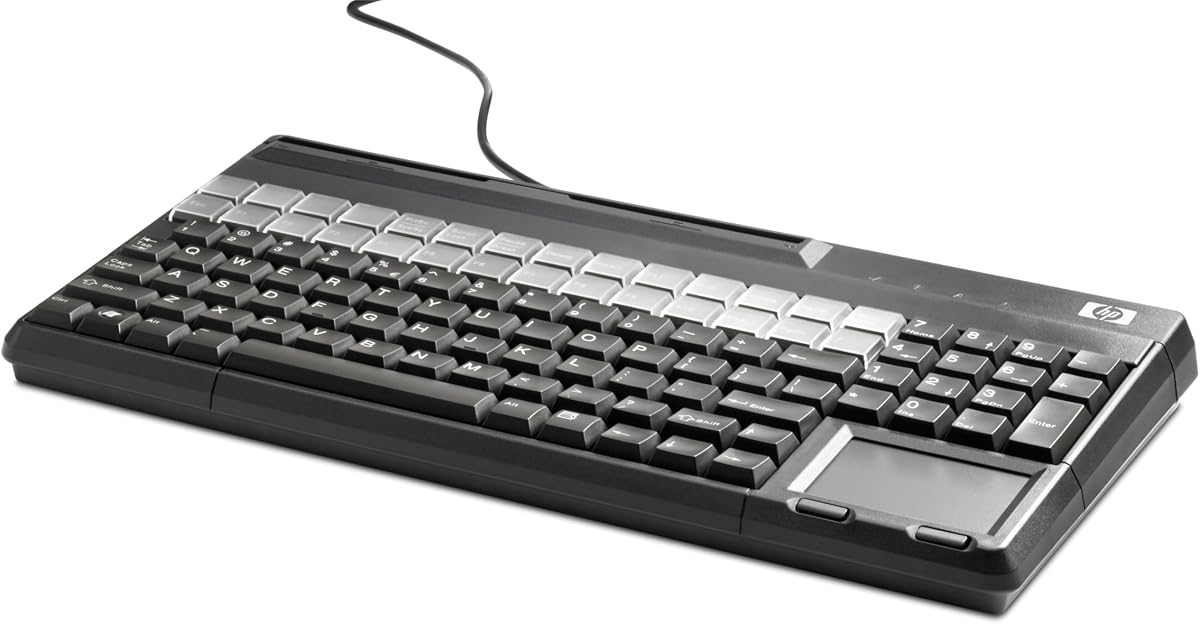
The HP POS Keyboard stands out as the top choice for businesses needing integrated functionality. It combines standard typing with card scanning and cursor control. This reduces the need for multiple peripherals at the register.
We may earn a commission when you buy through this link, at no additional cost to you.
Its standout quality is the magnetic stripe reader built directly into the chassis. Cashiers can swipe cards without reaching for a separate device. The 28 relegendable keys allow staff to customize shortcuts for frequent actions.
The main trade-off is the cost compared to basic models. You pay for the integrated features that streamline workflow. For high volume transactions this investment saves time and reduces counter clutter significantly.
This keyboard is ideal for retail stores handling payments on the spot. It suits environments where space is tight and speed matters. We recommend it for any POS setup prioritizing all-in-one efficiency.
The built-in card reader allows for faster transaction times by eliminating device switching.
Relegendable keys help staff create personalized macros for common menu items or tasks.
We may earn a commission when you buy through this link, at no additional cost to you.
The Cherry G86-62401 offers a premium compact solution for point of sale terminals. It merges a full keyboard with an integrated touchpad to save counter space. This model is built for environments where desk real estate is limited.
We may earn a commission when you buy through this link, at no additional cost to you.
Key strengths include its spill resistant construction which protects against liquid damage. The mechanical feel provides reliable feedback for continuous typing. The touchpad adds versatility without requiring an external mouse.
Some users may find the keys slightly smaller than standard desktop boards. The touchpad might need adjustment for precise control. These are minor compromises for the space savings it offers in tight setups.
We suggest this for cafes or kiosks needing a sleek look. It fits well in compact POS setups or portable units. Choose this when space efficiency is a top priority for your counter.
The smaller footprint allows for more room for customer interaction or display screens.
Spill resistant design ensures longevity in food and beverage service areas.
We may earn a commission when you buy through this link, at no additional cost to you.
The Adesso Easy Touch 630Ub is the top budget pick for durability. Its IP67 rating means it can handle spills or wash downs. This makes it perfect for kitchens or outdoor service areas.
We may earn a commission when you buy through this link, at no additional cost to you.
The large keys offer excellent visibility and ease of use. Staff can type quickly without looking closely at the labels. The robust build withstands rough handling better than typical office keyboards.
It lacks advanced features like programmable keys or integrated scanners. However the value is unmatched for basic transaction needs. The lower cost allows for multiple units across different shifts.
Ideal for food trucks or industrial workstations where spills happen. It provides reliable input without extra costs. Buy this when your primary goal is longevity and cleanliness on a budget.
Waterproofing allows for thorough cleaning which is vital in food service environments.
Large print sizes reduce errors during busy service hours.
We may earn a commission when you buy through this link, at no additional cost to you.
The Perixx PERIBOARD-513III offers a full size layout with an integrated touchpad. It includes a numeric keypad which is essential for data entry. The quiet scissor switches are gentle on the ears.
We may earn a commission when you buy through this link, at no additional cost to you.
Its main benefit is combining a keyboard and mouse in one unit. This simplifies cable management on crowded desks. The multimedia keys add convenience for system control during operations.
The touchpad area is somewhat compact compared to larger models. Also it relies on a physical USB connection. These do not hinder daily performance but limit flexibility for wireless setups.
We recommend this for general office or retail POS. The quiet operation helps in customer facing areas. Choose it when you want a full layout without using separate mouse devices.
Scissor switches reduce noise which improves customer experience during transactions.
The dedicated numeric pad speeds up entry for prices and quantities.
We may earn a commission when you buy through this link, at no additional cost to you.
The Cherry Lpos G86-71411 is built for complex workflow needs. With 169 keys it offers extensive layout options. The 42 relegendable keys allow deep customization for specific business logic.
We may earn a commission when you buy through this link, at no additional cost to you.
It includes a magnetic stripe reader similar to the HP model. This supports seamless payment processing on the device. The build quality reflects industrial standards for heavy usage.
The physical size is large which requires a spacious counter. The cost is higher than basic keyboards. These trade-offs are acceptable when you need extensive key mapping.
Suitable for large retail or warehouse POS systems. It handles complex SKU entry without extra screens. Select this if your workflow requires many direct key commands.
The high number of keys supports complex software functions without software menus.
Relegendable keys allow staff to adapt the hardware to specific daily tasks.
We may earn a commission when you buy through this link, at no additional cost to you.
The Logitech K120 is a reliable standard full size keyboard. It features a spill-proof design that protects against liquids. The deep profile keys offer comfort for long typing sessions.
We may earn a commission when you buy through this link, at no additional cost to you.
Its main strength is the balance of price and reliability. It requires no software installation to work. The design is simple and fits any standard desk environment.
It does not include specialized POS features like touchpads. Users need a separate mouse for navigation. This makes it less efficient for compact setups compared to all-in-one units.
We recommend this for basic POS systems needing low cost. It works well in back office or simple checkout areas. Pick this when you need a standard reliable input device.
Low price point allows for easy replacement across multiple terminals.
Spill protection extends the lifespan of the device in busy areas.
We may earn a commission when you buy through this link, at no additional cost to you.
The Cherry G86-71401 offers significant customization with 127 programmable keys. It includes a dedicated touchpad for cursor control. The build is designed for industrial durability in POS settings.
We may earn a commission when you buy through this link, at no additional cost to you.
The key strengths lie in its high programmability. Users can map complex functions to keys easily. The touchpad reduces the need for a separate mouse unit.
Some users may find the device heavy and bulky. Driver installation might be needed for full touchpad function. These issues are manageable with proper setup time.
Ideal for systems needing many keyboard shortcuts. It suits environments where speed and accuracy are key. Choose this if your POS software relies on custom key mappings.
127 programmable keys allow deep integration with POS software.
Touchpad integration reduces desk clutter and peripheral count.
We may earn a commission when you buy through this link, at no additional cost to you.
The Cherry KC 1000 is designed for secure card handling. It features an integrated smartcard terminal for secure PIN entry. It is FIPS 201 approved ensuring high security compliance.
We may earn a commission when you buy through this link, at no additional cost to you.
Its main strength is safety for sensitive transactions. The thin design keeps the counter looking clean. It supports multiple operating systems including Linux and macOS.
This model is specialized for card operations. It may not suit simple cash registers. The price reflects the security features included in the chassis.
Recommended for high security environments like banking or ID checks. Use this where card encryption is mandatory. Choose it for compliance with strict government or financial standards.
FIPS approval ensures it meets strict government security requirements.
Dedicated PIN pads protect user credentials during transactions.
We may earn a commission when you buy through this link, at no additional cost to you.
The Cherry G80-1800 uses mechanical switches for reliability. It features MX Black switches known for their linear feel. This compact unit is built to withstand industrial levels of use.
We may earn a commission when you buy through this link, at no additional cost to you.
Key benefits include dual USB and PS/2 interface support. It adapts to older or newer systems easily. The compact size fits tight industrial enclosures or kiosks.
Mechanical switches can be louder than membrane boards. Lack of touchpad may require extra mouse. These are standard trade-offs for industrial grade mechanical keyboards.
Best for factories or rugged environments needing stability. It offers long-term durability over consumer models. Choose this when your system demands high resistance to wear.
Mechanical switches offer over 100 million actuations per key.
Support for legacy PS/2 adds compatibility with older hardware.
We may earn a commission when you buy through this link, at no additional cost to you.
The Logitech K270 offers wireless flexibility for POS setups. It runs for 24 months on standard batteries. This reduces maintenance needs for remote counters.
We may earn a commission when you buy through this link, at no additional cost to you.
Its main strength is the freedom from cables. The spill proof design keeps it safe from common accidents. Multimedia keys help control system settings during operation.
Wireless can introduce minor latency in some setups. Batteries must be replaced over time. These factors should be weighed against the convenience of wireless use.
Suitable for setups where cable management is hard. It works well in open counter layouts. Choose this when you want to minimize wired connections on your desk.
Wireless allows placement further away from the terminal.
Long battery life reduces downtime for maintenance.
We may earn a commission when you buy through this link, at no additional cost to you.
Selecting the right POS keyboard requires understanding your specific workflow and environment needs. This section outlines the key factors to consider for a durable setup.
Industrial keyboards must withstand constant use and accidental spills. Look for models rated for high volume actuations. Check if the design supports easy cleaning and robust chassis materials.
Prioritize keyboards rated for heavy duty environments. Ensure they have reinforced frames to survive drops.
Determine if you need a full size layout with a number pad or a compact unit. POS work often requires frequent number entry. Compact models save desk space but reduce typing speed.
Choose a layout that matches your data entry needs. Full size layouts are best for high data volume.
Many POS keyboards include touchpads or card readers. These features reduce the need for separate mice or scanners. This saves counter space and simplifies setup.
Look for models with built-in touchpads if space is limited. Integrated scanners speed up payment processing.
For high security needs choose models with encrypted PIN entry. Smartcard readers are essential for compliance in finance. Ensure the keyboard meets relevant security standards.
Select keyboards with security compliance like FIPS or EMV. This protects sensitive customer data.
Decide between wired USB and wireless options. Wired connections offer stable reliability. Wireless models provide flexibility but need battery management.
Use wired for critical transaction points. Consider wireless for flexible back office use.
Some keyboards allow relegendable or programmable keys. These let staff create shortcuts for frequent tasks. This improves workflow speed and reduces errors.
Pick models with programmable keys if your software supports it. Custom keys streamline daily operations.
POS keyboards range from basic to premium integrated units. Higher costs come with more features like scanners. Balance price against the value of reduced hardware.
Assess your total setup cost. Sometimes an integrated unit saves money by removing separate parts.
Ensure the keyboard is compatible with your POS OS. Most support Windows but some support Linux. Check driver requirements for touchpads or special keys.
Verify OS compatibility before purchase. Drivers must work on your system for all features.
Start by connecting the keyboard to your POS terminal using USB or PS/2. If your model has special features like a touchpad ensure drivers are installed. Test all keys before starting service.
Clean your keyboard regularly to remove dust and crumbs. Use compressed air for the spaces between keys. For spill proof models wipe the surface with a damp cloth.
Store spare keyboards in a cool dry place. Avoid direct sunlight which can damage plastics. Check batteries regularly if you use a wireless model to prevent failure.
The HP POS Keyboard is often the best choice for retail. It includes a card reader and many relegendable keys. This reduces hardware clutter at the register.
Basic keyboards work plug and play. Models with touchpads or scanners usually need drivers. Check manufacturer documentation for software requirements.
Unplug the keyboard immediately. Turn it upside down to drain liquid. Let it dry completely before reconnecting to avoid damage.
Wireless models offer flexibility but may have lag. They are best for back office tasks. Wired models are preferred for critical checkout stations.
Relegendable keys allow you to replace the label stickers. This helps customize the layout for your specific software. It speeds up training for staff.
The Cherry KC 1000 supports Linux. Most standard USB keyboards work on Linux too. Check compatibility lists before buying for open systems.
We reviewed ten top models to find the right fit for different needs. The HP POS Keyboard leads for customization while the Adesso offers budget durability. Each model serves a distinct operational scenario.
When buying prioritize features that match your workflow volume. Security needs require specialized units with smartcard readers. Always balance cost with long-term reliability.
Prices and availability change so verify current listings before purchase. Check reviews for your specific use case. Select the unit that best aligns with your POS requirements.