
HP OfficeJet Pro 8125
3.9Editor score
AI print formatting
Wireless printing
Ink trial included
This guide compares the top ten AI printers for home and office use, evaluating performance, ink costs, and smart features to help you choose the right model.
Modern printing has evolved beyond simple text output to include intelligent features that optimize layout and reduce waste. AI printers use machine learning to enhance document quality and streamline workflows for both home and business users today.
We evaluated ten leading models based on print speed, connectivity options, ink efficiency, and smart capabilities. Our analysis focuses on real-world performance and reliability to ensure you find a device that meets your specific daily printing demands effectively.
Each pick highlights unique strengths like wireless ease, low cost per page, or advanced cutting features. Prices and availability change frequently so verify current deals before purchasing to ensure you get the best value for your budget needs.
3.9Editor score

4.0Editor score

4.2Editor score
This table provides a side-by-side overview of the ten selected AI printers highlighting key specifications and unique capabilities for quick comparison.





The HP OfficeJet Pro 8125 offers a compelling entry point into AI-enhanced home office printing. With a solid 3.9 rating from users, it balances affordability with smart features that reduce wasted paper and improve document formatting automatically.
We may earn a commission when you buy through this link, at no additional cost to you.
Its standout capability is the HP AI feature that optimizes print formatting for web pages and emails. This ensures you get clean layouts without extra pages. The device supports fast color printing at up to 20 ppm black and includes an automatic document feeder for scanning tasks.
While the color speed is lower at 10 ppm, this is acceptable for casual home use. The main trade-off is the cartridge lock mechanism which requires original HP chips. This ensures quality but limits third-party options for ink replenishment over time.
Buyers seeking a reliable home office printer should consider this model for its intuitive touchscreen and wireless stability. It remains a strong choice for small businesses needing professional color documents without high operational costs.
HP AI scans web pages to remove ads and navigation bars before printing. This saves paper and ink while delivering cleaner documents for professional use.
The dual-band Wi-Fi connection automatically resolves issues to keep printing smooth. You can print from phones or computers without frequent connection drops.
We may earn a commission when you buy through this link, at no additional cost to you.
The HP Smart Tank 5003 is designed for users who print frequently and want to avoid frequent ink purchases. With up to three years of ink included out of the box, it offers significant savings compared to traditional cartridge systems.
We may earn a commission when you buy through this link, at no additional cost to you.
Its key advantage lies in the mess-free refill system that allows easy ink replenishment without spills. The printer delivers sharp text and richer colors suitable for both documents and photos. It supports wireless printing and mobile app control for convenience.
While it lacks an automatic document feeder which some users might miss, the trade-off is a lower upfront cost and ongoing savings. The color output quality is excellent for home projects but speed is moderate compared to laser alternatives.
This printer is ideal for families or students with high-volume printing needs who prioritize cost efficiency. The included ink supply ensures you can start printing immediately without additional setup or purchases.
Refillable tanks eliminate the need for expensive cartridges. This model provides up to 6000 pages from the included ink supply.
Ink bottles plug directly into the tank to drain automatically. There is no squeezing or spilling during the refill process.
We may earn a commission when you buy through this link, at no additional cost to you.
The HP Envy 6155 focuses on delivering high-quality color prints for home users. With a 4.2 rating, it excels at producing vibrant documents and borderless photos that look true to screen. It is well suited for personal use where quality matters more than speed.
We may earn a commission when you buy through this link, at no additional cost to you.
Its True-to-Screen Tech ensures colors match what you see on your device. This makes it great for sharing personal photos or creative projects. The intuitive touchscreen makes navigation simple for all users regardless of technical skill.
The main limitation is the lower print speed which can be slow for large batches. The input tray capacity is also modest which means frequent reloading. These are acceptable trade-offs for a device focused on photo and document quality.
If you prioritize color accuracy and ease of use this printer is a top choice for home environments. It balances smart features with reliable wireless connectivity for daily tasks.
P3 color technology delivers richer tones for photos and documents. Prints remain vibrant and true to the original digital files.
The 2.4 inch touchscreen provides smooth navigation. You can set print jobs quickly using a phone-like menu layout.
We may earn a commission when you buy through this link, at no additional cost to you.
The Bambu Lab P2S Combo represents the advanced side of AI printers with 3D capabilities. It stands out with a 4.7 rating for its speed and precision. This device is ideal for creators and hobbyists who need professional-grade results quickly.
We may earn a commission when you buy through this link, at no additional cost to you.
Its AI failure detection and quick calibration ensure consistent quality without manual intervention. The multi-color printing system allows complex designs with multiple materials. Setup is fast so you can start printing within minutes of unboxing.
While it is more expensive than traditional printers the productivity gains are significant for 3D printing tasks. The learning curve is manageable thanks to intuitive software and automation features included in the workflow.
This model is perfect for makers who want to streamline their 3D printing process. The high speed and reliability make it a standout option in the creative tech space.
Built-in sensors detect print failures early to save material. The system can pause or restart automatically when issues occur.
The AMS 2 Pro unit manages multiple filament spools seamlessly. This enables complex multi-color prints without manual swapping.
We may earn a commission when you buy through this link, at no additional cost to you.
The HP OfficeJet Pro 9135 delivers top-tier performance for busy offices. With a 4.0 rating it combines speed with smart features like AI formatting and single-pass scanning. It is built to handle heavy workloads efficiently.
We may earn a commission when you buy through this link, at no additional cost to you.
Its single-pass duplex scanning is a major productivity booster allowing you to scan double-sided documents quickly. The large touchscreen makes navigation easy even for complex jobs. It also includes fax capabilities for traditional business needs.
While the size is larger than home models it justifies the space with dual trays and higher speeds. The use requirement ensures reliability but limits flexibility with third-party ink sources over time.
Businesses looking for a reliable all-in-one solution should choose this model. It streamlines document workflows with advanced features that save time and reduce manual effort.
The scanner reads both sides of a page in one pass. This doubles scanning speed compared to traditional two-pass methods.
Two 250-sheet trays reduce reloading frequency. You can manage large print jobs without constant monitoring or refills.
We may earn a commission when you buy through this link, at no additional cost to you.
The HP Smart Tank 7603 is designed for home offices needing high volume without cartridges. With up to 8000 color pages of ink included it offers long-term value. It adds fax capabilities which are useful for small businesses.
We may earn a commission when you buy through this link, at no additional cost to you.
Its mess-free refill system ensures you never run out unexpectedly. The magic touch control panel simplifies operation for daily tasks. It supports borderless printing which is great for photos and labels.
While it is slower than laser printers the cost savings over time are significant. The AI features help optimize layouts to save ink. This balance makes it ideal for frequent users.
Buyers who need fax and high volume should consider this model. It removes the hassle of cartridges while maintaining reliable connectivity and ease of use.
Built-in fax allows sending documents without a phone line. This feature supports traditional business communication needs.
The control panel responds to simple touches. Menus are clear and easy to navigate for all users.
We may earn a commission when you buy through this link, at no additional cost to you.
The HP OfficeJet Pro 8139 stands out with a full year of Instant Ink included. This offer provides significant value for new owners. It is well suited for home offices that need reliable fax and print capabilities.
We may earn a commission when you buy through this link, at no additional cost to you.
It matches the speed of the 8125 but adds fax support. The touchscreen interface is intuitive and supports wireless printing easily. AI features ensure documents print cleanly without wasted pages.
The main constraint is the chip requirement which ensures quality but restricts third-party cartridges. However the one year trial helps manage costs initially. It is a balanced option for regular use.
If you want long-term ink support this model is ideal. It combines essential office features with smart tools to streamline your workflow effectively.
A one-year trial of Instant Ink keeps costs predictable. This service delivers ink before you run out automatically.
Integrated fax allows sending and receiving documents remotely. This reduces the need for separate fax hardware.
We may earn a commission when you buy through this link, at no additional cost to you.
This version of the HP Smart Tank 7603 offers similar features to the previous model with a different color finish. It supports fax and scanning with high ink capacity. It is ideal for users needing reliable home office solutions.
We may earn a commission when you buy through this link, at no additional cost to you.
The refill system remains mess-free and easy to use. Magic touch panels simplify job selection and settings. Borderless printing ensures photos look professional without white borders.
Speed is moderate which is expected for ink tank models. The included ink lasts longer than cartridges so savings are realized quickly. AI formatting helps optimize paper use effectively.
Choose this if you want a proven tank design with fax support. It provides a low-maintenance printing experience for busy households.
Ink bottles plug directly into the tank. The system ensures no mess during the refilling process.
Buttons respond to light touches. Menus are clear and easy to navigate for all users.
We may earn a commission when you buy through this link, at no additional cost to you.
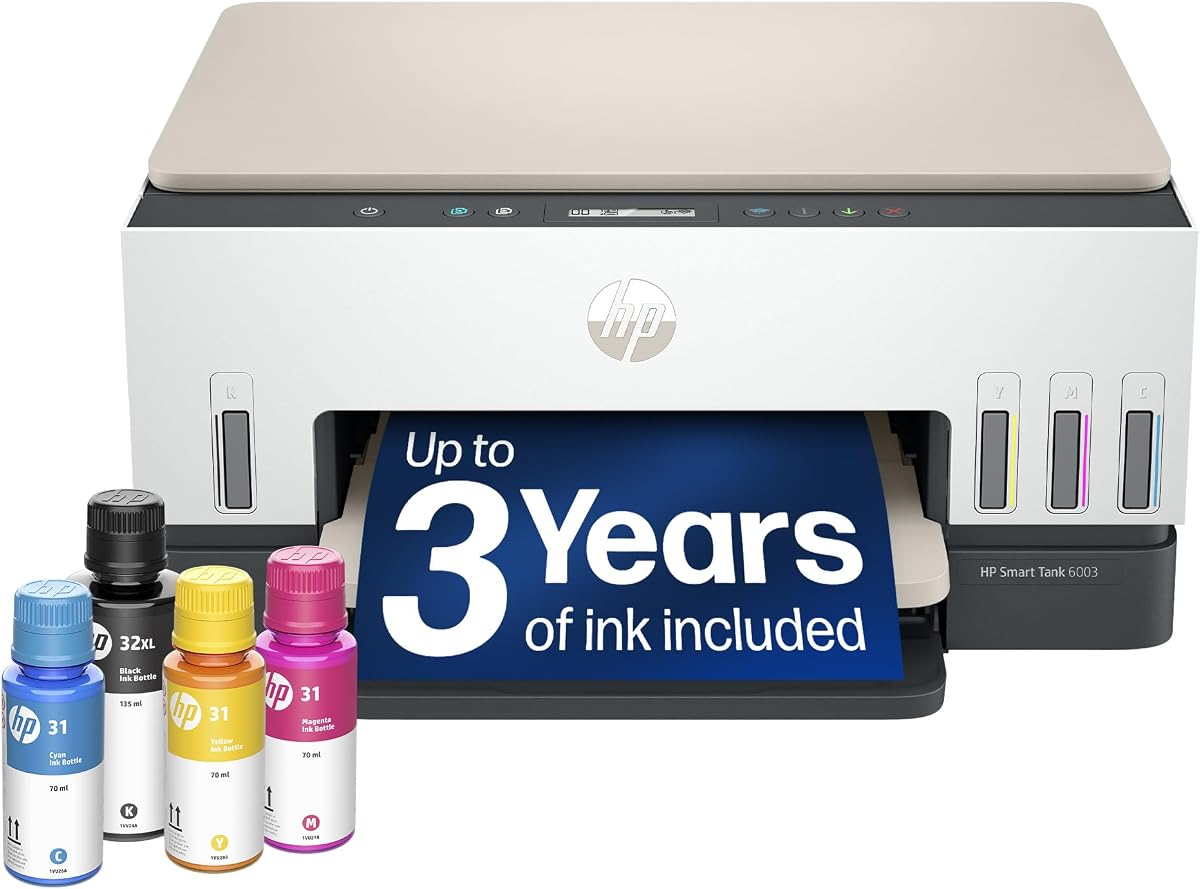
The HP Smart Tank 6003 is optimized for home users who want cost-effective printing. With up to 8000 pages included it reduces the need for frequent purchases. It supports borderless printing which is great for creative projects.
We may earn a commission when you buy through this link, at no additional cost to you.
Wireless connectivity ensures you can print from anywhere in the house. The tank design is simple to refill and maintain. AI features help optimize layouts for better quality results.
Lacking fax capabilities it is best for pure print and scan needs. The speed is moderate but acceptable for most home environments. Savings over time are the main benefit.
For households needing reliable and cheap printing this model fits well. It balances performance with practicality for everyday use.
Full-page printing without white borders enhances photo quality. This feature is ideal for personal or creative projects.
Dual-band Wi-Fi ensures stable wireless connection. You can print from mobile devices easily.
We may earn a commission when you buy through this link, at no additional cost to you.
The Liene PixCut S1 offers a unique all-in-one printing and cutting solution. With a 4.2 rating it excels in creating custom stickers and labels. Its AI extraction feature allows easy editing of photos for print projects.
We may earn a commission when you buy through this link, at no additional cost to you.
It uses dye-sublimation technology for vibrant color prints that are waterproof and scratch-resistant. The AI cutting ensures precise edges around shapes. This makes it perfect for crafters and gift creators.
While it is specialized for stickers it provides professional results. The app allows easy editing and design without extra software. It avoids subscription fees which is a huge plus for users.
If you want to create custom branded items this printer is ideal. It combines creative tools with reliable printing quality for small business or personal use.
The AI automatically isolates subjects from backgrounds. This speeds up design time significantly.
Dye-sublimation prints are long-lasting and waterproof. Colors remain vibrant and true to life.
We may earn a commission when you buy through this link, at no additional cost to you.
Choosing the right AI printer requires evaluating several key factors that affect performance cost and usability.
Print speed determines how quickly you can complete large jobs. Look for models with at least 10 ppm for text and 6 ppm for color to maintain productivity. Quality matters most for photos so check resolution and color technology.
Prioritize faster speeds for offices and higher resolution for home photo use.
Ink costs can exceed the printer price over time. Tank systems offer lower costs per page while cartridges are easier to replace. Check included ink trials to estimate initial savings.
Select tank printers for high volume and cartridges for convenience.
Wireless connectivity is standard but dual-band Wi-Fi reduces interference. Bluetooth allows mobile printing without network setup. Ensure support for AirPrint or Mopra for cross-platform use.
Choose models with robust wireless features for seamless remote printing.
AI features like formatting optimization reduce waste and improve results. Some models offer auto-cutting or image extraction for creative tasks. Look for apps that streamline workflow.
Opt for printers with AI tools that match your specific usage needs.
Larger input trays reduce reloading frequency for busy environments. Automatic document feeders are essential for scanning stacks of paper. Duplex printing saves paper automatically.
Pick larger trays and ADFs for office environments with heavy loads.
Business printers often include security features to protect data. Look for encryption and secure print options. Regular firmware updates maintain protection against threats.
Ensure the printer supports robust security protocols for sensitive documents.
Size matters for home desks or small offices. Compact models save space but may lack features. Check dimensions and weight before purchasing.
Measure your workspace to ensure the printer fits comfortably.
Extended warranties provide peace of mind for expensive models. Check manufacturer support availability and user reviews. Responsive support helps resolve issues quickly.
Prioritize brands with strong support reputations for long-term reliability.
Start by installing the printer drivers and apps from the manufacturer website. Connect the device to your Wi-Fi network following on-screen prompts for setup. Ensure your computer or phone recognizes the printer.
Update firmware regularly to maintain optimal performance and security. Use the app to check ink levels and replace cartridges or refill tanks as needed. Schedule test prints to maintain printhead health.
Store paper in a cool dry place to prevent moisture damage. Clean rollers monthly with a damp cloth to avoid jams. Follow manufacturer instructions for deep cleaning if print quality drops.
An AI printer uses machine learning to optimize print jobs. Features include layout adjustment, waste reduction, and predictive maintenance. These tools streamline workflows and improve output quality.
Ink tanks offer significantly lower costs per page. They are ideal for high-volume printing. Cartridges are easier to swap but cost more over time for frequent users.
Download the manufacturer app and follow setup instructions. Connect the printer to your home Wi-Fi network. Once linked, you can print from any device on the same network.
Yes, AI formatting removes ads and unnecessary content before printing. This ensures cleaner documents and reduces the number of pages used. It saves ink and paper.
Most brand printers use chip locks that block third-party cartridges. Tank models allow refills but recommend branded bottles. Check compatibility before purchasing alternative supplies.
Prioritize duplex printing, ADFs, and reliable wireless. Fax capabilities may be needed for some businesses. Ensure the device supports both print and scanning efficiently.
Check network stability and update firmware. Clear print queues and restart the printer. Use draft mode for internal documents to speed up output.
Most models support AirPrint and Mac drivers. Check system requirements before purchasing. Apps often offer full feature support for macOS users.
The HP OfficeJet Pro 8125 and 9135 lead for offices while the Liene PixCut S1 stands out for creativity. Tank models offer long-term savings for frequent users.
Prioritize features that match your daily workflow. Speed matters for businesses while cost per page matters for students and homes.
Always verify current pricing and deals before purchasing. Technology evolves quickly so checking availability ensures you get the best value today.