
GLOTRENDS 2-Pack M.2 SSD Heatsink
4.5Editor score
Universal 2280 compatibility
Passive aluminum fin cooling
Tool-less clamping system
This guide compares the top low profile SSD heatsinks for PS5 and PC builds, evaluating cooling performance, material quality, and fit for 2280 drives.
Modern NVMe SSDs generate significant heat during heavy workloads, which can lead to thermal throttling and reduced lifespan. A low profile heatsink offers essential cooling without adding bulk to tight internal spaces in laptops or gaming consoles like the PS5.
We evaluated ten top-rated low profile heatsinks based on material conductivity, thermal pad quality, installation ease, and verified user feedback. Each model was assessed for its ability to maintain safe operating temperatures under sustained read and write operations.
Every product pick includes detailed specifications, pros, cons, and real-world usage scenarios to help you find the right cooling solution. Keep in mind that availability and pricing may change frequently on Amazon and other retailers.
4.5Editor score

4.7Editor score

4.4Editor score
The following table provides a side-by-side comparison of the ten best low profile SSD heatsinks, highlighting key material specs and ideal use cases.



The GLOTRENDS 2-Pack M.2 SSD Heatsink offers exceptional value for users needing multiple cooling solutions without breaking the bank. With a 4.5 star rating, this passive aluminum fin system reliably reduces peak temperatures by 5 to 20 degrees Celsius under sustained loads.
We may earn a commission when you buy through this link, at no additional cost to you.
Its wide M.2 compatibility ensures it fits every standard 2280 NVMe and SATA drive, including the PS5 expansion slot. The tool-less installation with metal clasps or rubber bands allows for quick setup without voiding drive warranties or requiring specialized tools.
While the metal clasps and rubber bands may require occasional re-tightening over long periods, the cost savings and effective thermal performance make this a solid choice for budget-conscious builders looking to prevent thermal throttling.
We recommend this heatsink for anyone building a budget PC or upgrading a PS5 with multiple drives who prioritizes affordability and basic cooling efficacy over premium materials or aesthetic flair.
This heatsink supports Gen3 to Gen5 drives, ensuring future-proof cooling for high-speed NVMe SSDs in desktops and consoles.
Buying a two-pack reduces per-unit cost and lets you cool multiple drives in a multi-bay setup without extra shipping fees.
We may earn a commission when you buy through this link, at no additional cost to you.
This Graphene Coating Copper Heatsink stands out as a premium cooling option, leveraging graphene technology for thermal conductivity far beyond standard aluminum or copper. Users report significant cooling improvements due to the material’s unique ability to dissipate heat rapidly.
We may earn a commission when you buy through this link, at no additional cost to you.
The design includes professional air ducts and slanted slots, which not only look great but also increase surface area contact with ambient air for faster heat exchange. This makes it ideal for laptops and narrow spaces where airflow is restricted.
Installation is straightforward with silicone thermal pads, though the adhesive might leave residue if removed later. Despite the higher price point, the performance gain and aesthetic appeal justify the cost for enthusiasts who demand the best thermal solution.
Buyers seeking the ultimate thermal performance in a visually striking package should consider this graphene-coated radiator, especially for high-end laptops or compact builds where efficient heat dissipation is critical.
Graphene offers a thermal conductivity of 5300W/mK, vastly outperforming traditional materials for maximum SSD protection.
The slanted slot pattern improves airflow efficiency while providing a unique look compared to flat standard heatsinks.
We may earn a commission when you buy through this link, at no additional cost to you.
With a 4.6 star rating, this laptop-focused M.2 heatsink delivers exceptional cooling in a minimal package. Made from 100% polished copper, it offers superior heat transfer compared to aluminum, ideal for tight laptop internal enclosures.
We may earn a commission when you buy through this link, at no additional cost to you.
The 1.5mm thickness ensures compatibility with most slim notebooks, and the inclusion of two units provides excellent value. Rubber rings and thermal pads allow flexible mounting options without stressing the delicate internal chassis of portable machines.
While the lack of screw mounts requires precise placement, the nano thermal pads ensure consistent contact even on uneven surfaces. The trade-off is minor given the high performance and reliability reported by users across various laptop models.
If you need to cool an M.2 SSD in a laptop or tight enclosure, this copper option balances performance, thickness, and price perfectly for daily reliability and sustained speeds.
Polished copper ensures rapid heat movement away from the controller to prevent throttling during long gaming sessions.
At only 1.5mm thick, this heatsink fits into narrow internal gaps without interfering with battery or keyboard components.
We may earn a commission when you buy through this link, at no additional cost to you.
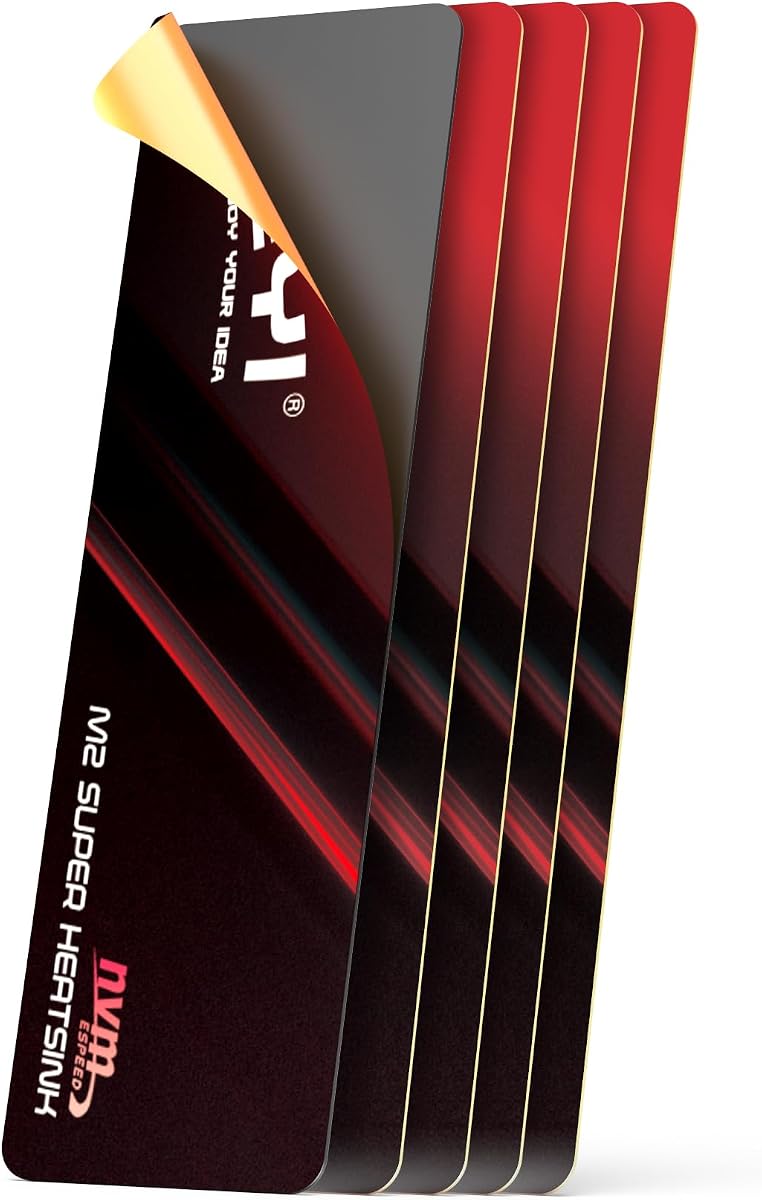
JEYI’s 0.5mm ultra-thin film heatsink is designed for scenarios where every millimeter counts, such as the PS5 expansion slot or ultra-thin laptops. Utilizing graphene-copper foil, it provides a reported peak temperature reduction of 25 degrees Celsius.
We may earn a commission when you buy through this link, at no additional cost to you.
The dual-sided cooling feature allows users to apply thermal pads on both sides of the SSD for maximum heat dissipation. This setup prevents throttling and maintains peak speeds, making it ideal for high-performance portable or console builds.
Handling requires care during peeling to avoid bending the thin film, but once properly adhered, the bond is permanent and stable. While it demands precise installation, the result is a powerful, space-saving cooling solution for constrained environments.
Choose this heatsink if you face severe space constraints but still demand top-tier cooling performance, particularly for PS5 or compact laptop upgrades where thickness is a primary limitation.
This minimal thickness ensures the drive fits even in the tightest expansion bays without modification to the case.
Applying cooling to both sides doubles the heat dissipation area, significantly lowering controller temperatures.
We may earn a commission when you buy through this link, at no additional cost to you.
Priced under six dollars, this double-sided heatsink offers incredible value without sacrificing performance. Its aluminum alloy body with anodic oxidation surface helps eliminate static electricity, protecting your drive during installation and operation.
We may earn a commission when you buy through this link, at no additional cost to you.
The double-sided clip design ensures a stable fit on various M.2 NVME SSDs, while the included thermal silicone pads are safe for direct contact. Users report reliable 10 to 20 degree cooling improvements for both PCs and PS5s.
While the clips are plastic and may wear over time with repeated removal, the ease of installation and effective cooling make it a top pick for budget builds. It delivers solid protection against overheating during heavy gaming or file transfers.
For anyone seeking a reliable, budget-friendly cooling solution for a standard 2280 SSD, this double-sided option provides all the necessary features without unnecessary complexity.
Silver plating on the aluminum body prevents static buildup that could potentially damage sensitive electronics during installation.
Double-sided clips secure the heatsink firmly regardless of whether the drive is single or double-sided.
We may earn a commission when you buy through this link, at no additional cost to you.
This 67x18x1.5mm pure copper heatsink is engineered for devices where space is extremely limited, like notebooks or handheld consoles. Copper's superior thermal conductivity ensures that accumulated heat is released quickly into the air.
We may earn a commission when you buy through this link, at no additional cost to you.
The groove design on the surface increases the effective heat dissipation area, enhancing cooling performance even in a small package. Users note that it fits seamlessly into tight slots on precision equipment and internal boards.
While the narrow width means less surface area for heat radiation, the material choice compensates significantly for this limitation. It is an excellent choice for maintaining stable data transfer speeds in compact electronics.
If your device has minimal clearance and demands high conductivity, this pure copper option provides the most efficient cooling for your specific space constraints.
Strategic grooves increase air contact and dissipate heat faster than flat surfaces in confined enclosures.
Ideal for laptops, internal boards, and compact electronics where even millimeters of thickness matter.
We may earn a commission when you buy through this link, at no additional cost to you.
The be quiet! MC1 delivers exceptional cooling performance with a 4.7-star rating, making it a top choice for PS5 users and enthusiasts. Its dimensions are optimized specifically for PlayStation expansion slots, ensuring a perfect fit without interference.
We may earn a commission when you buy through this link, at no additional cost to you.
Supporting both single and double-sided M.2 2280 modules, this cooler keeps drives running at full performance for extended periods. The design emphasizes quiet operation, aligning with the brand’s reputation for low-noise components.
While it uses standard aluminum rather than premium composites, its consistent performance and reliability justify the price. It is a premium pick for those who value brand trust and precise engineering in their storage upgrades.
Recommend this cooler for PS5 expansions or any build where quiet, reliable cooling is a priority without requiring exotic materials.
Dimensions are tailored to slot perfectly into the PS5 storage expansion slot for a seamless upgrade.
Works seamlessly with both single-sided and double-sided SSD modules, providing broad compatibility.
We may earn a commission when you buy through this link, at no additional cost to you.
Featuring graphene coating on copper, this heatsink offers high performance comparable to similar premium models. With a 4.7-star rating, it excels in dissipating heat through professional air ducts and slanted slots that maximize airflow.
We may earn a commission when you buy through this link, at no additional cost to you.
Designed specifically for PS5 and laptop use, it fits standard 2280 NVMe drives and includes silicone thermal pads for secure, tool-free installation. Users report a 10 to 20 degree Celsius cooling gain, effectively preventing thermal throttling.
The trade-off involves potential adhesive residue upon removal, but the performance benefits and sleek design make it worth the price for many enthusiasts. It represents a top-tier option for console or compact PC storage upgrades.
For those prioritizing maximum thermal conductivity and a stylish look in a console or laptop environment, this graphene copper option is a leading contender.
Air ducts and slanted slots increase contact area for efficient heat exchange with ambient air.
The dimensions are ideal for PS5 expansion slots, ensuring compatibility without case modifications.
We may earn a commission when you buy through this link, at no additional cost to you.
This 0.5mm slim pure copper heatsink is built for maximum compactness while maintaining excellent thermal performance. Its chemical polished thermal pads are burr-free to prevent short circuits and ensure long service life.
We may earn a commission when you buy through this link, at no additional cost to you.
The package includes a screwdriver, spudger, and screws for easy installation, making it user-friendly despite its ultra-thin design. Pure copper material ensures accumulated heat is released quickly, maintaining SSD reliability.
While handling requires care to avoid bending, the result is a lightweight and efficient solution for laptops or cramped enclosures. The inclusion of tools adds value and simplifies the upgrade process for DIY enthusiasts.
Choose this option if you need the thinnest possible copper heatsink and appreciate having all necessary tools included in the box.
Smooth, burr-free pads prevent oxidation and short circuits, extending the life of your drive.
Installation tools are included, saving you a trip to the hardware store for simple setup.
We may earn a commission when you buy through this link, at no additional cost to you.
This Micro Connectors heatsink features a 5mm low-profile height with cross-cut aluminum fins that optimize heat dissipation. Its black finish provides a subtle look suitable for PCs and PS5s alike, while thermal pads simplify installation.
We may earn a commission when you buy through this link, at no additional cost to you.
Heat-resistant silicone rings secure the heatsink firmly, ensuring stability during use. The design works on standard motherboards and adapters, making it versatile for various desktop or console setups.
While 5mm may be slightly thick for some ultra-slim laptops, it is robust enough for most PC and console applications. It balances effective cooling with reliable mounting options at a fair price point.
Ideal for PC or PS5 users who need a reliable, low-profile aluminum heatsink with a simple installation process and secure fit.
The fin pattern maximizes airflow across the surface, improving heat transfer compared to flat designs.
Silicone rings keep the heatsink stable without requiring screws or complex hardware.
We may earn a commission when you buy through this link, at no additional cost to you.
Selecting the right low profile heatsink requires balancing material conductivity, thickness, and compatibility with your specific build.
Materials like copper and graphene conduct heat more efficiently than aluminum, allowing for faster dissipation and lower peak temperatures. Consider higher conductivity materials if your SSD runs hot under sustained workloads.
Prioritize copper or graphene composites for maximum cooling, but aluminum is sufficient for casual usage and offers a lighter, cheaper alternative.
Measure your available space carefully; a heatsink that is too thick may not fit inside laptops, PS5 expansion slots, or compact cases. Check that the combined height of the SSD and heatsink fits within your device's limits.
Opt for ultra-thin models under 3mm if your clearance is limited, ensuring you can install the drive without modifying the chassis or risking damage.
Some heatsinks use adhesive thermal pads or silicone rings, while others rely on metal clasps or screws. Adhesive solutions are easier to install but may leave residue; clips offer stability but may wear over time.
Choose a mounting method that aligns with your comfort level; adhesive is great for quick installs, while mechanical fasteners provide more secure long-term mounting.
Not all heatsinks are compatible with double-sided drives or specific laptop models. Ensure the product explicitly lists support for your SSD type and device, especially for PS5 expansions.
Verify compatibility for 2280 drives and check if the model supports both single and double-sided configurations to avoid fit issues.
The thermal pads included should have good conductivity and low viscosity to bridge the gap between SSD and heatsink effectively. Poor-quality pads can reduce cooling efficiency or damage components over time.
Look for kits that include high-quality thermal pads or consider buying separate high-conductivity pads if they are not included.
Some heatsinks feature slanted slots or unique patterns that can enhance the visual appeal of your build. While aesthetics are secondary to performance, they may matter for transparent cases or visible installations.
Balance visual design with functional cooling; don't compromise too much on performance for looks unless it fits your build theme perfectly.
Budget options often come in multi-packs or use standard aluminum, while premium models use graphene or pure copper. Assess your budget against the performance gains offered by higher-end materials.
For high-performance builds, investing in a premium model is worthwhile; for basic systems, a budget option may suffice to prevent throttling.
Brands like be quiet! are known for reliability and quality control, while generic brands may vary. Check user reviews for consistency and support responsiveness before making a purchase.
Stick to reputable sellers or brands with positive feedback to ensure you receive a functional product with reliable customer service.
Before installation, power off your device and disconnect all cables. Remove the existing SSD if needed and check that the internal area is clean and free of dust to ensure optimal contact.
Apply the thermal pad evenly on the SSD controller and carefully place the heatsink on top, ensuring it aligns correctly. Secure it using the provided clips, rings, or adhesive as instructed to maintain consistent pressure.
After installation, monitor your drive temperatures using system tools to verify the heatsink is working effectively. Avoid removing the heatsink frequently as this may degrade thermal pads or disturb the mounting structure.
While not strictly required, a heatsink helps prevent thermal throttling during extended gaming sessions. Sony recommends using a heatsink for the expansion slot to maintain stable performance and prevent overheating in confined spaces.
For laptops, look for models under 3mm, ideally around 1.5mm to 2mm. For PS5 or PC builds, 3mm to 5mm is acceptable if your case or expansion slot clearance allows for the additional height.
Some models support both single and double-sided SSDs, while others may only work on single-sided drives. Always check the product specs or description to confirm compatibility with your specific SSD configuration before buying.
Most low-viscosity pads are safe to remove, but strong adhesives may leave residue. Gently peel the pad using a plastic tool to avoid scratching the SSD surface, and clean any residue with alcohol if necessary.
Generally, no. Using a heatsink that doesn't require soldering or permanent modification is safe. However, if you use screws or forceful mounting, check your warranty terms to ensure you don't void the coverage.
Most low profile heatsinks can reduce peak temperatures by 5 to 20 degrees Celsius, depending on your environment and load. High-performance models using copper or graphene may see even greater drops under heavy usage conditions.
We reviewed ten top options including the be quiet! MC1 and GLOTRENDS 2-Pack, each offering distinct advantages based on your needs. Premium graphene models provide maximum cooling, while budget aluminum options deliver essential protection.
Prioritize material conductivity and thickness for your specific device to ensure a proper fit and effective thermal management. Whether you are upgrading a laptop or PS5, the right heatsink ensures your drive performs reliably.
Always check current stock and pricing on Amazon since availability can fluctuate. Use the links provided to compare the latest offers and select the model that best fits your budget and build requirements today.