
SYNERLOGIC Mac OS + Word/Excel
4.7Editor score
Includes Office shortcuts
Military-grade vinyl
Bubble-free application
Finding the right Mac Keyboard Shortcut Sticker can transform your daily workflow and boost productivity significantly. These handy decals place essential commands directly on your palm rest, allowing you to learn faster without interrupting your creative or professional tasks. Whether you are a student, designer, or developer, having quick access to shortcuts saves time and reduces reliance on mouse clicks.
We have carefully evaluated ten leading options available in the market today to bring you this comprehensive roundup. Our selection process focused on durability, clarity of print, adhesive quality, and compatibility with various MacBook models and macOS versions. By comparing real user feedback and product specifications, we ensure that every recommendation offers genuine value for your specific setup.
Each pick in this list highlights unique strengths such as residue-free removal, multi-pack value, or specialized layouts for applications like Excel and Word. We have also considered factors like color options and print longevity to ensure your sticker remains useful for years. Please note that while we strive for accuracy, prices and availability may change frequently on retail platforms.
4.7Editor score

4.6Editor score

4.6Editor score
As an Amazon Associate we earn from qualifying purchases.
The following table provides a side-by-side comparison of all ten products reviewed in this guide. It highlights key specifications such as compatibility, adhesive type, and design features to help you make an informed decision quickly.

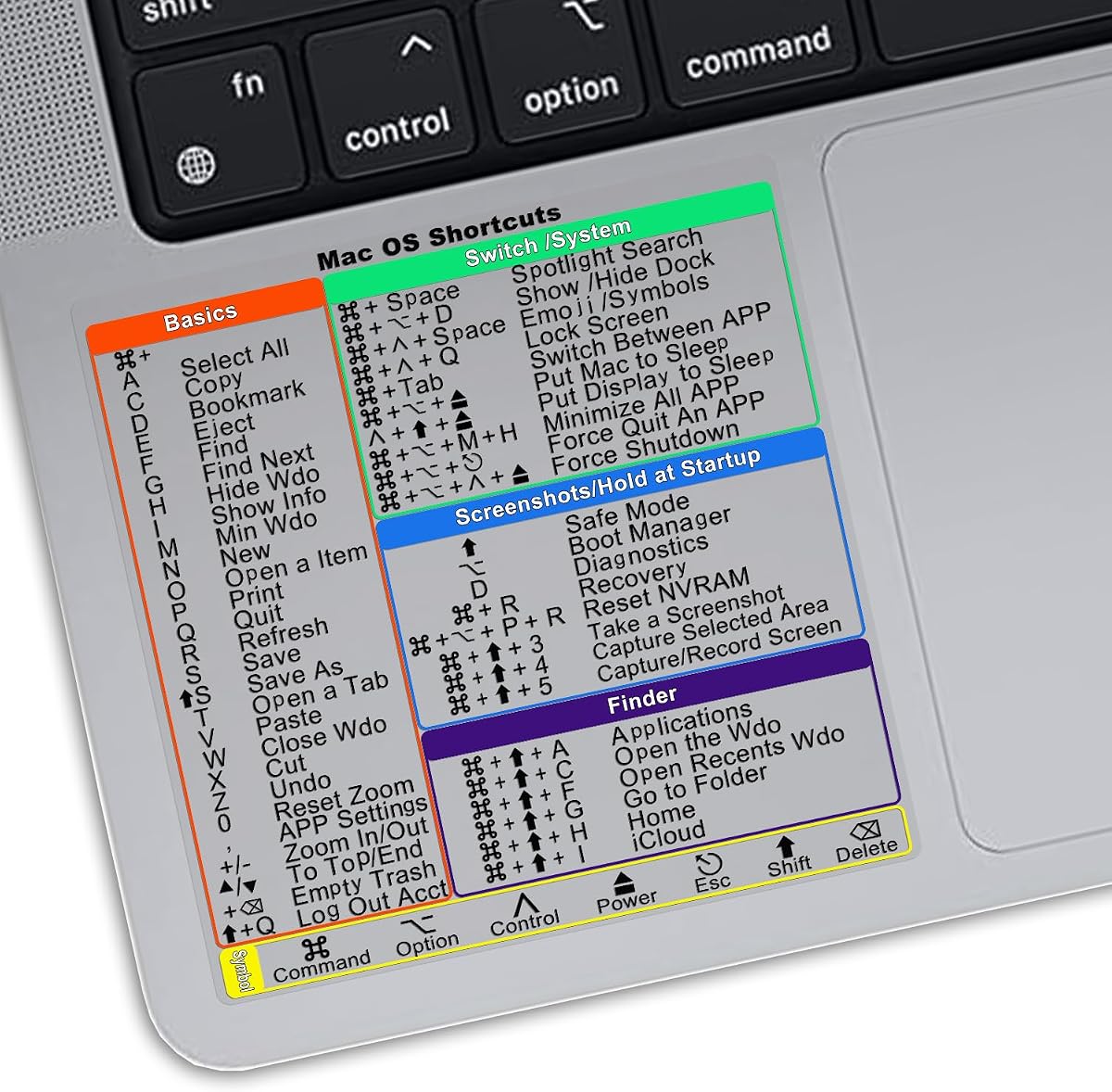


The Synerlogic Mac OS Shortcuts Sticker stands out as our top choice for users seeking a reliable and durable solution. With a strong rating of 4.6, it promises instant mastery of essential commands without the need for constant online searches. Its laminated vinyl construction ensures longevity, making it suitable for daily typing and palm rest contact.
We may earn a commission when you buy through this link, at no additional cost to you.
This product is designed specifically for MacBook Air and Pro models, ensuring a precise fit that does not interfere with keys or sensors. The clear with white design blends seamlessly with most laptop finishes while providing high contrast for easy reading. Users appreciate the detailed layout that groups shortcuts logically for faster learning.
While the adhesive is strong enough to stay put, it may leave a light residue upon removal. However, this can be easily wiped away with warm soapy water. The application process requires patience to avoid air bubbles, but the result is a professional-looking cheat sheet that enhances productivity significantly.
Ideal for students and professionals alike, this sticker helps you work faster and smarter by keeping critical commands at your fingertips. Whether you are new to macOS or a power user, the Synerlogic sticker offers the balance of durability and clarity you need for efficient workflow management.
Stop searching online for basic shortcuts and keep essential commands visible on your device for instant access.
Made with laminated vinyl in the USA, this sticker resists wear and tear from daily typing and handling.
We may earn a commission when you buy through this link, at no additional cost to you.
For users who rely heavily on productivity software, the SYNERLOGIC Mac OS + Word/Excel sticker offers incredible value. With a high rating of 4.7, it combines essential macOS shortcuts with critical commands for Word and Excel, making it a comprehensive tool for office environments. The military-grade vinyl ensures it withstands frequent use without fading or peeling.
We may earn a commission when you buy through this link, at no additional cost to you.
The design features clear text on a transparent background, allowing it to blend with your keyboard while remaining legible. It is compatible with a wide range of devices including MacBook Air, Pro, iMac, and Mac Mini, making it versatile for mixed hardware setups. The inclusion of startup commands for both M-chip and Intel processors adds to its utility.
Application requires care to avoid bubbles, but once applied, the sticker provides a smooth surface that does not hinder typing. The adhesive is designed to hold firmly but can be removed if necessary. Users report that it significantly reduces the time spent looking up basic commands like copy paste and find.
This option is perfect for beginners and seasoned professionals who want to streamline their workflow without spending much. Whether you are a student managing assignments or an employee handling reports, having these shortcuts visible ensures you stay focused on your tasks rather than hunting for functions.
Get quick access to essential Word and Excel shortcuts directly on your keyboard for faster document editing.
Built with outstanding military-grade durable vinyl to ensure long-lasting performance in busy work environments.
We may earn a commission when you buy through this link, at no additional cost to you.
The 2026 Mac OS Shortcuts Sticker is engineered for those who demand premium quality and care for their device. Its standout feature is the zero residue adhesive, which ensures safe removal without leaving glue marks or discoloration on your MacBook. This makes it an ideal choice for users who may want to remove the sticker later without damage.
We may earn a commission when you buy through this link, at no additional cost to you.
Crafted from premium water-repellent matte vinyl, this sticker shrugs off coffee spills and smudges effectively. The ultra-thin 0.10mm design ensures it remains virtually invisible under your wrists, maintaining the sleek aesthetic of your laptop. It is specifically designed to fit MacBook Neo, Air, and Pro models including the latest 13 and 16 inch sizes.
The layout is curated to show only the shortcuts you will actually use, grouped by task for easy scanning. This focus on essentials prevents clutter and makes it easier to remember commands over time. The fade-resistant print stays sharp for years, ensuring long-term utility even with heavy daily use.
Whether you have a light or dark MacBook, there are color options like Clear Black or Clear White to ensure optimal readability. This product is perfect for tech-savvy users who want a professional, clean look without compromising on functionality. It delivers peace of mind regarding surface protection while enhancing your typing experience.
Premium vinyl with residue-free adhesive lifts off cleanly when you are ready to remove it.
Water repellent matte vinyl protects your palm rest from spills and smudges while keeping your Mac looking new.
We may earn a commission when you buy through this link, at no additional cost to you.
This Mac OS Keyboard Shortcuts Sticker offers robust compatibility with a wide range of macOS versions from Mojave to the latest releases. It features over 50 essential shortcuts in a clean layout designed to streamline your workflow and boost efficiency. The residue-free vinyl ensures that you can remove it easily without leaving any sticky mess behind.
We may earn a commission when you buy through this link, at no additional cost to you.
Designed specifically for 13 to 16 inch MacBook Pro and Air models, it ensures a precise fit that covers the palm rest area effectively. The clear with black text design provides excellent contrast for readability. It is water and scratch resistant, making it durable enough for daily typing and palm rest contact.
The adhesive is formulated to secure the sticker in place while remaining removable. Users should note that it is not suitable for MacBook models smaller than 13 inches. The customizable color options allow you to choose a shade that complements your device finish for a personalized look.
Perfect for users of all skill levels, this sticker makes it easy to learn commands and memorize them over time. Whether you are a student or professional, having these shortcuts visible helps you avoid frustration and focus on your work. It is a practical tool for anyone looking to master their Mac efficiently.
Compatible with macOS versions including Tahoe Sequoia Sonoma Ventura Monterey Big Sur Catalina and Mojave.
Crafted with premium materials to resist scratches water and tears for long-lasting performance.
We may earn a commission when you buy through this link, at no additional cost to you.
The KEANBOLL 2-Pack offers exceptional value by providing two sets of stickers for you or a colleague. Updated for 2026, it supports M1 through M5 chips ensuring compatibility with the latest MacBook Air and Pro models. The no-residue vinyl peels off cleanly protecting your MacBook resale value with no sticky mess left behind.
We may earn a commission when you buy through this link, at no additional cost to you.
Each pack features a clear transparent design that blends seamlessly into your keyboard backlight while providing essential Mac commands. The UV-resistant ink and scratch-proof vinyl ensure the print stays sharp even with daily typing friction and palm rest contact. It is also compatible with iMac and Mac Mini keyboards for broader use.
Laser-cut for precision, this sticker aligns perfectly with US layout spacing without overlapping keys or blocking sensors. The 3 1/4 by 3 1/4 inch size fits standard 13 to 16 inch MacBook models. Users appreciate the instant mastery it provides without requiring constant searching for shortcuts online.
Whether you are switching from Windows or new to Final Cut Logic this cheat sheet serves as a visual guide to navigate like a pro. The fade-resistant print and durable material make it a long-term investment for productivity. Having a spare set ensures you always have a backup ready for new devices.
Get a spare set or share with a colleague ensuring you always have a backup for new devices.
Laser-cut for MacBook Pro and Air models to align perfectly with US layout spacing and avoid blocking sensors.
We may earn a commission when you buy through this link, at no additional cost to you.
With an impressive rating of 4.8, this 3-Pack set offers the highest customer satisfaction among the options reviewed. It includes three clear keyboard shortcut stickers compatible with 13 to 16 inch MacBook Air and Pro as well as iMac and Mac Mini. The universal compatibility makes it an excellent choice for teams with mixed devices.
We may earn a commission when you buy through this link, at no additional cost to you.
The stickers feature essential Mac OS and Excel shortcuts for reference ensuring quick access to commands for every user. They are designed to fit various MacBook Air and Pro inch models including the newer 13.6 and 15 inch versions. Apple Silicon support ensures that M1 through M5 chip models are fully covered.
Each sticker is clear with black text providing high contrast for readability against different device backgrounds. The adhesive is formulated to hold securely without leaving residue upon removal. The 3 1/4 by 3 1/4 inch size is standard for most laptop palm rest areas.
This set is perfect for offices or families where multiple users need to learn or refresh their shortcut knowledge. Having three stickers means you can distribute them across different workstations or keep one as a spare. It is a practical and affordable solution for boosting productivity across multiple devices simultaneously.
Ideal for offices or families with multiple devices needing quick access to keyboard shortcuts for every user.
Designed to fit 13 to 16 inch MacBook Air and Pro as well as 21 to 27 inch iMac and Mac Mini.
We may earn a commission when you buy through this link, at no additional cost to you.
This Synerlogic Universal option stands out for its ability to fit Neo Air and Pro models as well as iMacs and Mac Minis. It is designed regardless of CPU type or macOS version ensuring broad compatibility across Apple hardware. The laminated vinyl construction ensures durability against wear and tear from daily use.
We may earn a commission when you buy through this link, at no additional cost to you.
The sticker keeps the most important keyboard shortcuts visible on your device making it easy to boost your skills and speed up tasks. It includes a friendly reminder that the symbol stands for the Shift key to avoid confusion. The clear-white design provides good contrast for easy reading.
Made in the USA this product is backed by responsive customer support and a satisfaction guarantee. The adhesive holds strongly but may leave a light residue when removed. This can be easily wiped off with a soft cloth and warm soapy water for a clean surface.
Whether you are a student or professional this tool helps you work faster and smarter by avoiding frustration. The application process requires folding back a small section to apply gradually for a smooth finish. It is a reliable choice for anyone looking to enhance their Mac usage efficiency.
Fit is perfect for any MacBooks Neo Air and Pro as well as iMacs and Mac Minis regardless of CPU type.
Designed printed and packaged in the USA and backed by responsive customer support and a satisfaction guarantee.
We may earn a commission when you buy through this link, at no additional cost to you.
This SYNERLOGIC 4-Pack offers a variety of color choices including Black White Clear and Rainbow to match your style or device. It features the most essential shortcuts conveniently placed right in front of you for easy learning and quick lookup. The military-grade durable vinyl ensures professional appearance and long-lasting performance.
We may earn a commission when you buy through this link, at no additional cost to you.
Designed for Intel Macbooks including Pro 13 15 and 16 inch as well as 11 and 13 inch Air and 12 inch Retina it covers a wide range of older models. Shortcuts work for MacOS 11 Big Sur and any Mac OS 10 versions ensuring compatibility across different software versions. The size is 3.25 by 2.7 inches.
The responsive and dedicated customer service team is here to promptly respond to messages and resolve any issues you may have. You can easily reach a new level of computer proficiency using this convenient and affordable sticker. It saves both time and frustration for users of all skill levels.
This set is ideal for users who want to match their sticker to their device or laptop multiple locations with different colors. The OEM appearance ensures it blends well with your Mac aesthetic. It is a versatile choice for anyone looking to improve their workflow with essential keyboard commands.
Choose from four color options including Black White Clear and Rainbow to complement your device finish.
Shortcuts work for MacOS 11 Big Sur as well as any Mac OS 10 versions including Catalina Mojave High Sierra.
We may earn a commission when you buy through this link, at no additional cost to you.
Designed specifically for Word and Excel users this sticker provides quick reference keyboard shortcut stickers for essential commands. It keeps the most important shortcuts conveniently placed right in front of you to easily learn new shortcuts and lookup commands without the need to Google it. The clear white design ensures good visibility.
We may earn a commission when you buy through this link, at no additional cost to you.
Compatible with the new 2020 to 2023 Macbooks Pro and Air including 14 and 16 inch as well as all previous 13 and larger models. It is perfect for any age or skill level students or seniors at home or in the office. The strong adhesive hold ensures it stays in place during typing.
The peel and stick all at once method only works for thin decals not for stickers like ours so application requires care. Fold back a small section line it up and press gradually as you peel more for fewer air bubbles. The adhesive may leave a light residue when removed but wipes off easily with warm soapy water.
Whether you are a seasoned computer professional or a beginner this sticker will save you both time and frustration guaranteed. You can easily reach a new level of computer proficiency using our convenient and affordable sticker. It is an ideal tool for anyone looking to master Office apps on their Mac.
Focuses on essential Word and Excel shortcuts to help you edit documents faster without interrupting your flow.
Compatible with the new 2020 to 2023 Macbooks Pro and Air as well as all previous 13 and larger models.
We may earn a commission when you buy through this link, at no additional cost to you.
Founded as a classroom training center in 2001 TEACHUCOMP offers a trusted sticker for users seeking educational quality. With a rating of 4.8 it provides essential shortcuts right where you need them most to save time and increase efficiency. The laminated vinyl is scratch resistant waterproof and features a no-residue adhesive for clean removal.
We may earn a commission when you buy through this link, at no additional cost to you.
The large 3.25 by 3.25 inch size is designed for larger laptops 13 inch and larger. It is available in two sizes and color choices to fit your available space. Alphabetized shortcuts make it easy to locate every time and the professional design ensures they look great on any device.
Keyboard shortcuts are meant to save time and increase efficiency enabling you to work faster more efficiently and with increased precision. For those with mobility or vision difficulties keyboard shortcuts can be truly indispensable. This sticker is perfect for individual users as well as corporate and non-profit training.
Trust the TeachUcomp brand of software training products which has been teaching people how to use their software since 2001. We are a team of software training professionals who love what we do. Whether you are a student or professional this sticker helps you master your Mac effectively and safely.
Founded as a classroom training center in 2001 TeachUcomp offers a trusted sticker for users seeking educational quality.
The large 3.25 inch size is designed for larger laptops 13 inch and larger making shortcuts easy to read.
We may earn a commission when you buy through this link, at no additional cost to you.
Choosing the right sticker involves considering compatibility, material quality, and the specific commands you need. This guide breaks down the essential factors to help you select a product that enhances your workflow without compromising your device.
Ensure the sticker is designed for your specific MacBook model size. Some stickers are meant for 13 to 16 inch models while others fit smaller 11 or 12 inch units. Check the product details to confirm if it supports Neo Air Pro or iMac keyboards.
Always verify that the sticker aligns with your keyboard layout to avoid blocking keys or sensors.
Look for no-residue or residue-free adhesives to prevent damage to your laptop surface upon removal. Strong hold is necessary to prevent peeling but it should not leave sticky marks. If the adhesive is new it may leave a light residue that can be cleaned with warm soapy water.
Prioritize products that allow for clean removal if you plan to sell your device or replace the sticker later.
Durable vinyl with laminated protection ensures the sticker withstands daily typing friction and palm rest contact. Water repellent and scratch resistant materials protect against spills and wear over time. Military-grade vinyl options provide an extra layer of longevity for heavy users.
Select materials that remain durable after long to ensure your commands stay visible and legible for years.
Choose a layout that organizes shortcuts logically by task such as basics navigation and screenshots. Essential-only collections prevent clutter and make it easier to memorize frequently used commands. Alphabetized lists help you locate specific shortcuts quickly without scrolling through irrelevant options.
Opt for designs that highlight essential commands relevant to your workflow such as Office shortcuts for office workers.
Select a color that contrasts with your device finish for optimal readability. Clear with black text works well on light MacBooks while white or opaque options suit dark models. Ensure the print is high contrast so you can see commands without straining your eyes.
Consider the aesthetic impact of the sticker on your laptop to ensure it complements the design rather than clashing.
Multi-pack sets offer value for families or offices with multiple devices to cover. Buying a spare set ensures you have a backup if the original gets damaged or lost. Compare the price and quantity to find the best option for your budget and usage needs.
Evaluate whether buying individual packs or multi-packs makes more sense based on how many devices you need to equip.
To apply the sticker effectively clean your palm rest area with a soft cloth to remove dust and oils. Fold back a small section of the backing and line up the sticker with your wrist position. Press gradually as you peel more to avoid air bubbles and ensure a smooth finish.
After application avoid touching the adhesive directly to prevent oils from affecting the stick. If any residue remains upon removal use warm soapy water and a soft cloth to wipe it off gently. Do not use abrasive cleaners that might scratch your device surface or damage the sticker print.
Regularly inspect the sticker for signs of wear or peeling to maintain readability. If the print fades or corners lift consider replacing the sticker to keep your workflow efficient. Proper care ensures the sticker lasts long enough to help you master your Mac shortcuts fully.
Most clear stickers are designed to be transparent enough to let backlight shine through while keeping text visible. If your keyboard has bright backlighting the sticker may appear slightly dimmer but commands remain readable. Look for ultra-thin options if visibility is a major concern.
Yes many of these stickers are universal and designed to fit iMac keyboards as well as MacBooks. Check the product specifications to confirm size and compatibility with your specific iMac model. Universal options ensure you can use the same sticker across different Apple devices.
These stickers typically use no-residue or premium vinyl adhesives that are safe for laptop surfaces. If any residue remains it can be easily removed with warm soapy water without damaging your device. Always test a small corner first if you are concerned about surface sensitivity.
Most quality stickers allow for clean removal without leaving marks on your palm rest. Gently peel back a corner and use a soft cloth with warm soapy water to wipe away any residue. Avoid pulling too quickly to prevent scratching the surface or tearing the sticker.
Yes the stickers are updated to reflect essential shortcuts that remain consistent across macOS versions like Sonoma and Tahoe. Some products specifically mention compatibility with 2026 models and recent software updates. Always check the product details for the latest version support before buying.
Most standard stickers are designed for US English layouts which are the most common. If you use a non-English keyboard check for specific region versions or universal layouts that avoid language-specific symbols. Contact customer support for compatibility if you are unsure about your keyboard language.
Choosing the right Mac Keyboard Shortcut Sticker can significantly enhance your daily workflow and productivity. Whether you opt for the Synerlogic Mac OS Shortcuts Sticker for its durability or the SYNERLOGIC Office pack for its value, these products offer practical ways to learn essential commands faster.
Focus on factors like adhesive quality and layout clarity to ensure the sticker meets your specific needs. A well-designed cheat sheet reduces reliance on the mouse and helps you navigate your device with precision. Always prioritize compatibility with your specific MacBook model and macOS version.
Remember to check current prices and availability before purchasing as offers may change frequently. We hope this guide helps you find the perfect tool to boost your skills and keep your work efficient for years to come.