
Redragon S101-3 PRO Gaming Keyboard
4.5Editor score
Full RGB backlight
Macro recording keys
Includes gaming mouse
Find the best keyboard for Fortnite with our expert guide comparing top mechanical, wireless, and budget options for peak gaming performance.
Selecting the right keyboard for Fortnite can dramatically improve your building speed and accuracy in intense battle royale matches. Competitive players demand rapid response times and customizable keys to execute complex movements without delay during critical fights.
We evaluated ten leading keyboards based on switch type, build quality, and layout efficiency to help you find the perfect match. Our analysis covers mechanical, magnetic, and membrane options suitable for various budgets and play styles across different gaming setups.
Each pick highlights specific strengths like rapid trigger modes or compact designs that free up mouse space for low sensitivity aiming. Keep in mind that availability and shipping costs may vary over time so check current listings before making your final decision.
4.5Editor score
4.5Editor score

4.5Editor score
This side-by-side comparison highlights the core specifications and unique selling points of each keyboard to help you quickly identify the model that best suits your specific Fortnite playing requirements and desk constraints.






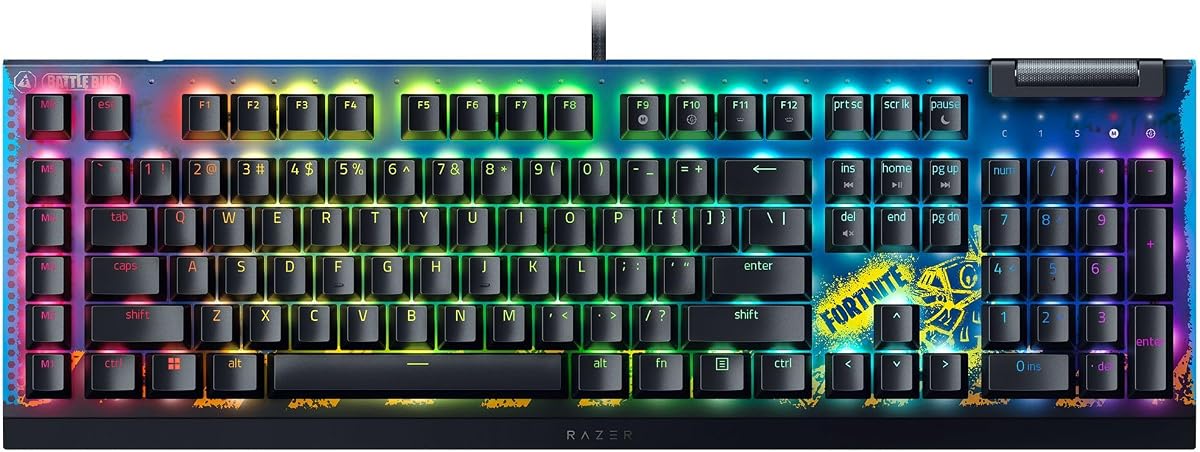
This mechanical keyboard stands out as a top contender for Fortnite enthusiasts due to its rapid linear switches and dedicated macro keys. With a strong rating from users it delivers the responsiveness needed for complex building sequences without accidental presses interrupting your flow during matches.
We may earn a commission when you buy through this link, at no additional cost to you.
The standout feature is the set of six macro keys that let you assign favorite building commands to single buttons for instant access. Combined with the 1.2mm actuation point these switches ensure every tap registers immediately which is critical when you need to counter an opponent's rush.
One trade-off is the lack of wireless support which means cables remain essential for a stable connection on your desk. This wired approach ensures zero latency which benefits competitive play though it may limit portability compared to wireless models that offer flexibility.
If you prioritize speed and customization this keyboard is an excellent investment for serious Fortnite players. Its ability to program macros directly into the hardware means your setups save even if you switch computers making it a reliable choice for tournament travel.
The linear switches eliminate tactile bumps allowing for rapid double-tapping which is essential for fast edits and structural resets during combat encounters.
Programming specific button combos for ramp or box edits helps you execute complex maneuvers consistently without needing to press multiple keys simultaneously under pressure.
We may earn a commission when you buy through this link, at no additional cost to you.
Designed with durability in mind this membrane keyboard offers robust protection against accidental spills which can happen during long gaming sessions. Its quiet switches and comfortable design make it suitable for users who need a reliable peripheral without disturbing others nearby.
We may earn a commission when you buy through this link, at no additional cost to you.
The IP32 water resistance is a key benefit that protects your investment from liquid damage so you can focus on your game without worrying about accidental drops. This feature combined with the magnetic wrist rest ensures long sessions remain comfortable even when you lean forward during intense building.
Unlike mechanical keyboards this model does not offer physical feedback per key press which some players prefer for precise timing. However the smooth membrane action still provides consistent registration which works well for general navigation and standard game inputs.
For gamers seeking a cost-effective and durable solution this keyboard delivers solid performance without requiring high maintenance. Its quiet profile makes it an ideal choice for late-night practice or shared rooms where noise levels might be a concern for others.
The water-resistant design ensures that minor spills do not ruin the device allowing you to continue playing without interruption or costly replacements.
The magnetic wrist rest provides consistent support for your hands reducing strain during extended matches and helping maintain accuracy throughout the day.
We may earn a commission when you buy through this link, at no additional cost to you.
This value set provides a complete solution for new Fortnite players who need both a keyboard and a mouse without breaking the bank. The keyboard includes dedicated macro keys that can be programmed to execute building sequences quickly helping you gain an edge in resource fights.
We may earn a commission when you buy through this link, at no additional cost to you.
The inclusion of a high-precision mouse complements the keyboard well by allowing you to adjust sensitivity for precise tracking while you build. This all-in-one approach ensures compatibility between devices and simplifies setup for those who prefer not to mix and match brands.
The membrane switches are quieter than mechanical alternatives which makes them suitable for shared living spaces where loud clicks might disturb roommates. While they lack the sharp tactile feedback of mechanical switches they still provide enough resistance to prevent accidental key presses during play.
If you are looking for an affordable entry point into gaming peripherals this combo offers excellent reliability and customization options. The ability to save settings directly to the hardware means your layout remains consistent even after restarting your computer.
Getting both high-quality keyboard and mouse in one package saves time and money making it ideal for those just starting their competitive gaming journey.
The dedicated macro keys let you assign complex building sequences to single button presses which speeds up your gameplay significantly.
We may earn a commission when you buy through this link, at no additional cost to you.
The compact layout of this keyboard is ideal for players who use low mouse sensitivity and need extra room to flick their cursor across the screen. By removing the number pad it creates a streamlined design that keeps your hands close together reducing fatigue during long sessions.
We may earn a commission when you buy through this link, at no additional cost to you.
Its anti-ghosting technology ensures that multiple simultaneous key presses are registered correctly which is crucial when building structures rapidly. The LED backlighting allows you to see your keys clearly even in dim environments ensuring you never miss a button due to poor visibility.
While the switches mimic mechanical feedback they are membrane-based which means they may not offer the same level of durability as true mechanical keys. However this design choice keeps costs low and allows you to enjoy a compact form factor without a significant financial investment.
This keyboard is perfect for portable setups or limited desk space where a full-sized board would feel overwhelming. Its detachable cable and lightweight design make it easy to transport if you ever need to play at a friend's house or LAN event.
Removing the numpad gives you more room to move your mouse freely which is essential for controlling low-sensitivity builds and precise aiming.
The detachable cable and compact size make this unit easy to pack in a backpack for gaming sessions on the go.
We may earn a commission when you buy through this link, at no additional cost to you.
This keyboard utilizes magnetic switches that eliminate physical contact for actuation providing unmatched speed and reliability for competitive play. The rapid trigger feature allows you to press release and press again instantly which is vital for quick movement adjustments in high-pressure Fortnite battles.
We may earn a commission when you buy through this link, at no additional cost to you.
With an 8000Hz polling rate the keyboard communicates with your computer almost instantly ensuring that your commands are executed exactly when you intend. This level of responsiveness can be the difference between landing a shot or missing it entirely in fast-paced scenarios.
The ability to adjust actuation points means you can set individual keys to trigger with light taps or firm presses based on your preference. However the web driver requirement means you will need a Windows system to unlock these advanced customization features effectively.
If you want the absolute fastest response times available this keyboard is a top-tier option for serious gamers. Its compact size and high-performance capabilities make it a favorite for those who demand every advantage during ranked matches and tournaments.
The rapid trigger mode allows for instant resets which means you can tap keys repeatedly without delay for smoother movement.
Adjusting actuation depth gives you precise control over how keys respond allowing you to tailor the keyboard to your specific play style.
We may earn a commission when you buy through this link, at no additional cost to you.
Offering the freedom of wireless connectivity this keyboard maintains high performance for gaming while keeping your desk clean and organized. The 2.4GHz connection ensures stable data transmission which is critical for maintaining your focus on the game without signal interruptions.
We may earn a commission when you buy through this link, at no additional cost to you.
The 75 layout retains essential arrow keys and function keys making it versatile for both gaming and general use. Hot-swap capability allows you to change switches if you ever want to alter the feel of your typing without needing to buy a completely new device.
Side-printed keycaps provide a modern aesthetic that stands out while remaining durable against daily wear. The dedicated knob adds convenience by letting you adjust volume or brightness quickly without fumbling through menu settings during a match.
This keyboard is an excellent choice if you want a premium feel with the flexibility to customize its internals. Its battery life supports long gaming sessions ensuring you are not tethered to a cable while still enjoying mechanical precision.
The 2.4GHz connection provides a stable and fast response rate that matches wired performance for competitive gaming scenarios.
Hot-swap support means you can swap switches to match your preferred feel without soldering or technical expertise.
We may earn a commission when you buy through this link, at no additional cost to you.
Designed for precision this keyboard delivers an 8000Hz polling rate that significantly reduces input delay compared to standard models. The magnetic switches offer adjustable actuation which allows you to fine-tune each key's sensitivity to match your specific movement habits in Fortnite.
We may earn a commission when you buy through this link, at no additional cost to you.
The web driver interface provides a straightforward way to configure macros and lighting effects without needing heavy software installations. This accessibility makes it easier for players to optimize their setup quickly and adjust it as their playstyle evolves over time.
While the compact design helps save space it removes some function keys that are usually mapped to essential actions. Players may need to use function combinations to access these features which can take some time to memorize during intense play.
If speed and customization are your priority this keyboard offers high-end features at a competitive price point. Its ability to register inputs almost instantly ensures that your reactions are translated into the game with minimal delay.
The 8000Hz polling rate ensures that your inputs are registered multiple times faster than standard keyboards for a competitive edge.
Tailoring actuation points allows for personalized sensitivity which helps reduce fatigue and improve consistency in high-intensity fights.
We may earn a commission when you buy through this link, at no additional cost to you.
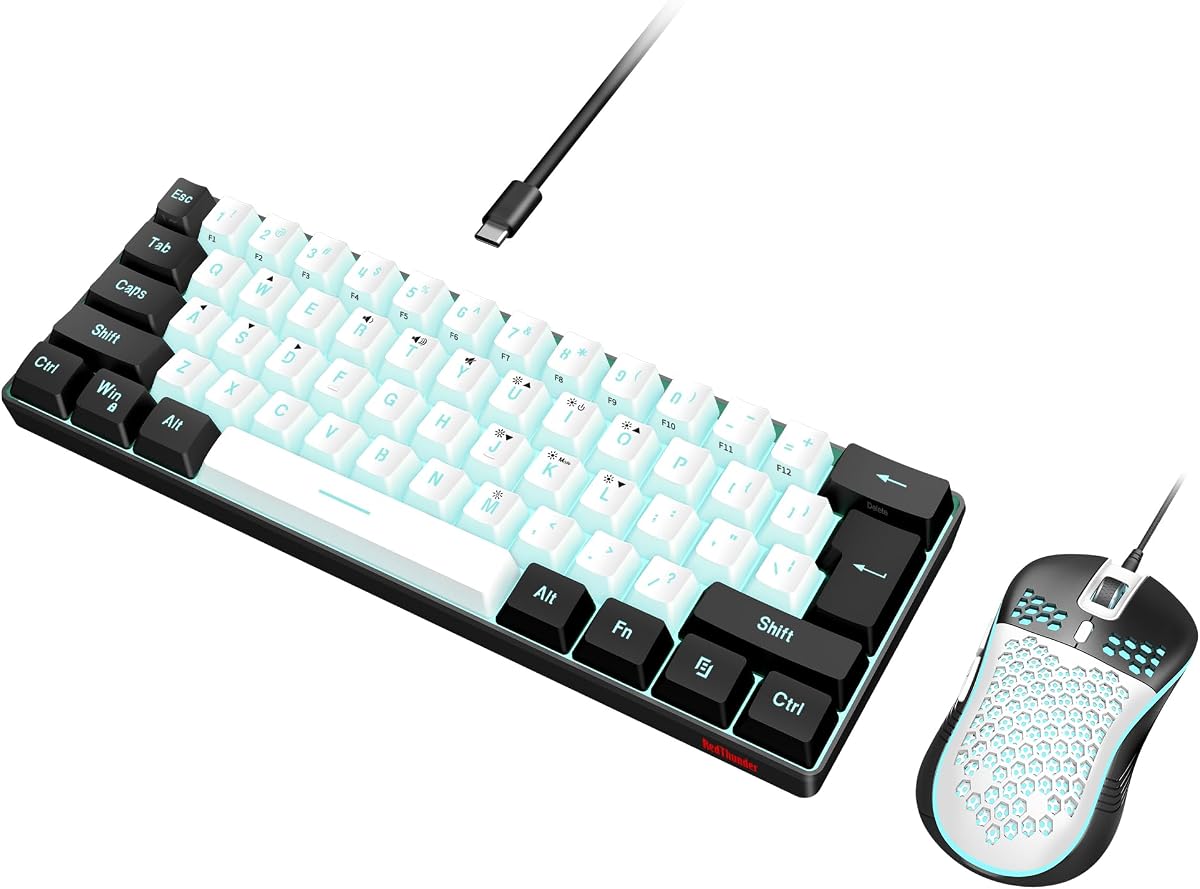
This combo set focuses on space efficiency by offering a 60% keyboard that leaves maximum room for mouse movements during low-sensitivity play. The water-resistant design adds a layer of protection against spills which is practical for any gaming environment.
We may earn a commission when you buy through this link, at no additional cost to you.
The included honeycomb mouse is incredibly light helping to reduce wrist strain during long sessions. This weight reduction can improve your ability to flick quickly across the screen giving you a better chance at hitting precise shots while building.
The keyboard uses a simple membrane design that provides reliable typing without the cost of mechanical switches. While it lacks advanced customization features the straightforward layout works well for gamers who prefer simplicity over complex programming options.
For players seeking a minimalistic setup this kit provides everything needed to start playing immediately. Its small footprint makes it ideal for smaller desks or travel where portability is more important than premium features.
The 60% layout removes unnecessary keys to free up desk space which is crucial for players using large mouse pads.
The lightweight honeycomb shell reduces fatigue and allows for quicker movements which benefits fast-paced aiming scenarios.
We may earn a commission when you buy through this link, at no additional cost to you.
Designed with esports athletes in mind this keyboard provides the speed and precision needed for competitive environments. The clicky switches deliver distinct feedback with every press ensuring you know exactly when a command has been registered.
We may earn a commission when you buy through this link, at no additional cost to you.
The tenkeyless design removes the number pad to keep the keyboard compact and portable. This feature is ideal for players who travel to tournaments or simply prefer a tighter layout to maintain focus on their immediate surroundings.
Onboard memory allows you to save your lighting configurations directly to the device which is useful when using tournament computers that restrict software installation. This convenience ensures your setup remains consistent regardless of the system you are using.
If you enjoy tactile feedback and need a reliable portable option this keyboard is a strong choice. Its durable construction and ergonomic design support consistent performance even during the most intense matches.
The audible and tactile click provides clear confirmation for every press helping you maintain rhythm during rapid building.
The detachable cable and compact size make this unit easy to pack and transport without risking damage to the device.
We may earn a commission when you buy through this link, at no additional cost to you.
This keyboard brings magnetic switch technology to a budget-friendly price point making advanced features accessible to a wider range of gamers. The rapid trigger mode allows for fast resetting which helps you react quickly when building or adjusting your position mid-fight.
We may earn a commission when you buy through this link, at no additional cost to you.
The adjustable actuation points let you customize how deeply you need to press each key to activate. This level of control helps you reduce effort during long sessions and can improve overall comfort and consistency over time.
PBT keycaps ensure that the legends remain visible even after extended use while providing a textured surface that resists grease. The web driver simplifies the programming process allowing you to map keys without heavy software dependencies.
If you want high-end magnetic tech without a high-end price this keyboard delivers excellent value for its capabilities. Its robust features allow you to compete with premium setups at a fraction of the cost.
Rapid trigger functionality eliminates the reset delay enabling faster continuous inputs for smooth movement and editing.
PBT keycaps provide a premium feel and long-lasting clarity ensuring your setup looks sharp even after long gaming marathons.
We may earn a commission when you buy through this link, at no additional cost to you.
Choosing the right keyboard depends on several key factors that influence your building speed accuracy and comfort during matches.
Mechanical switches come in linear tactile or clicky varieties each offering different feedback that suits different play styles. For Fortnite linear switches are often preferred because they allow rapid double tapping and continuous pressing without resistance which is crucial for fast editing and building.
Look for a switch that offers low actuation force and travel distance to minimize the effort required for each press and maximize your response time.
The physical layout of a keyboard affects how much space you have for mouse movement. Compact layouts like TKL 60% or 65% remove the number pad to free up room which is essential for players using low mouse sensitivity.
A smaller footprint keeps your hands closer together reducing strain and allowing for tighter movements during intense matches.
Wired keyboards generally offer the lowest latency making them the preferred choice for competitive play. However wireless models have improved significantly with 2.4GHz connections that match wired performance for most users.
Consider your desk setup and whether you prefer the flexibility of a wireless connection or the reliability of a cable.
Fortnite requires complex keybinds for building editing and managing inventory. Keyboards with dedicated macro keys or robust software allow you to program sequences that simplify these actions.
Programmable keys can save you time by executing multiple commands with a single press which is a huge advantage in high-pressure situations.
A keyboard used for gaming undergoes frequent and intense key presses so durability is critical. Look for units with PBT keycaps and high-rated switches that can withstand millions of keystrokes without fading or failing.
Quality construction ensures your keyboard remains reliable over time even under aggressive use during long sessions.
Gaming keyboards range from affordable membrane models to expensive mechanical and magnetic units. Determine how much you are willing to invest based on your skill level and how much you value precision features.
Budget options can still perform well but may lack advanced customization or speed features found in higher-end models.
RGB lighting not only enhances the look of your setup but also helps you see keys in low light conditions. Per-key lighting allows for specific color coding which can help you identify important keys quickly.
Customizable lighting can make your setup look cohesive with other gear which improves the overall gaming atmosphere.
Long gaming sessions can lead to hand fatigue if the keyboard is not comfortable. Look for options with wrist rests or ergonomic designs that support natural hand positions.
Proper ergonomic design reduces strain and allows you to play longer without discomfort which maintains your focus during matches.
To get the most out of your keyboard start by configuring your keybinds in Fortnite to match your preferred building workflow. Ensure that essential actions like jumping and editing are mapped to easily accessible keys to minimize reaction time.
Keep your keyboard clean by gently blowing air into the key gaps to remove dust and debris. Regularly wipe down keycaps with a microfiber cloth to prevent buildup of oils and dirt which can affect switch feel.
If your keyboard uses software for macros or lighting update it regularly to ensure compatibility and access to the latest features. Avoid exposing the keyboard to liquid spills and always unplug it if you move it to a different location.
While not strictly required mechanical keyboards offer faster response times and durability which are beneficial for competitive play. They provide the precision needed for complex building sequences without sacrificing longevity over time.
Compact keyboards like TKL or 60% layouts free up desk space allowing for larger mouse movements which are common in Fortnite. This extra space can improve accuracy and reduce fatigue during extended play sessions.
Rapid trigger mode allows keys to reset instantly after release enabling faster continuous presses. This feature is highly valued in fast-paced games for executing quick movements and edits without delay.
Magnetic switches eliminate physical contact which reduces wear and tear on internal components. This design often results in a longer lifespan compared to traditional mechanical switches.
You cannot convert a wired keyboard to wireless without specific adapters. If you need a wireless connection choose a model designed with built-in Bluetooth or 2.4GHz wireless capabilities.
Look for low latency reliable switches and a layout that fits your desk. Prioritize comfort and customization features that help you execute actions quickly and accurately during gameplay.
Use a can of compressed air to blow dust out from under the keycaps. For spills wipe gently with a damp cloth but avoid using harsh chemicals that might damage the plastic components.
Modern wireless gaming keyboards with 2.4GHz connections offer latency levels comparable to wired options. They are generally suitable for competitive play without impacting performance.
Selecting the right keyboard can significantly enhance your performance and comfort during intense Fortnite battles. Whether you opt for a magnetic switch model for speed or a budget-friendly combo for value ensure it meets your layout and customization needs.
Prioritize factors like switch speed desk footprint and macro capabilities to find a keyboard that supports your specific playstyle. Investing in a durable and responsive keyboard pays off in faster reactions and smoother gameplay overall.
Remember to check current listings for availability and updated details before making your purchase. The right tool can make a tangible difference in how you perform so choose wisely based on your individual priorities.